❌

Vue normale

Get UltraPic Pro Free for 90 Days – AI Photo Editor Giveaway (November 2026)

Par : Scorpio
14 novembre 2026 à 22:58

Last updated: November 14, 2026 — new giveaway link added for November.

If you edit product photos, remove backgrounds, or touch up portraits, this one is worth two minutes of your time. UltraPic, the browser-based AI photo editor from AOMEI Technology, is running a limited-time giveaway that hands out a free UltraPic Pro activation code valid for 90 days. Pro unlocks the paid AI tools — background generation, batch editing, generative fill, watermark removal, and HD downloads — without a subscription.

Below I cover what the code unlocks, how many credits each tool uses, and exactly how to redeem it.

⚡ Quick Heads-Up: The November 2026 giveaway code is live now and the offer page says it expires in November. Grab it from the button at the bottom of this post before it runs out.

What Is UltraPic?

UltraPic is an online AI photo editing platform developed by AOMEI Technology, the company behind AOMEI Backupper and Partition Assistant. It is built mainly for e-commerce sellers, content creators, and digital marketers who need clean, professional product images without spending hours in Photoshop.

It runs entirely in the browser — no installation required — and works on Windows, macOS, and any modern browser. It is popular with Amazon, Shopify, Etsy, Flipkart, and Meesho sellers who need clean, platform-ready product photos at scale.

UltraPic AI background remover removing the background from a product photo


What Do You Get with the UltraPic Pro Giveaway?

The giveaway code activates UltraPic Pro for 90 days (shown as “Pro (90 days)” on the activation screen). According to the giveaway page, it unlocks:

  • AI Background Removal & Replacement — Cut out products or people cleanly and swap in a white or custom background.
  • AI Background Generator — Create new, studio-style scenes behind your product in seconds.
  • Batch Editor — Edit up to 50 images at once — ideal for sellers with large catalogues.
  • HD Original Image Download — Export full-resolution, platform-ready images.

UltraPic’s Pro plan also lists these tools, which are limited on the free tier:

  • Photo Retouching — Enhance portraits and product shots with AI retouching.
  • AI Generative Fill — Fill or modify parts of an image with AI — handy for expanding scenes or fixing tight crops.
  • Watermark Remover — Remove watermarks from your own images.
  • Magic Eraser — Remove unwanted objects, people, or distractions from a photo.

UltraPic AI background generator creating a new scene behind a product


How Many Credits Does Each Feature Use?

UltraPic works on credits. These are the per-feature costs listed on the official giveaway page:

Feature Credit cost
HD original image download 1 credit / image
Batch background removal 1 credit / image
AI background generation 5 credits / 2 images
2x HD upscaling 5 credits / 1 image

For reference, UltraPic’s paid Pro plan includes 500 credits a month. Your exact balance and expiry date after redeeming the code are shown under Account Settings → Credit Details.


UltraPic Pricing: What the Free Code Is Worth

Here is how UltraPic’s plans compare (prices from the official pricing page, November 2026):

Plan Price Credits
Free $0 10 credits / week
Pro $9.99/month (or $5.99/month billed yearly) 500 credits / month
Pro+ $29.99/month (or $14.99/month billed yearly) 5,000 credits / month

At the monthly Pro price, 90 days of Pro would normally cost about $29.97 — this giveaway gets you Pro access for free.
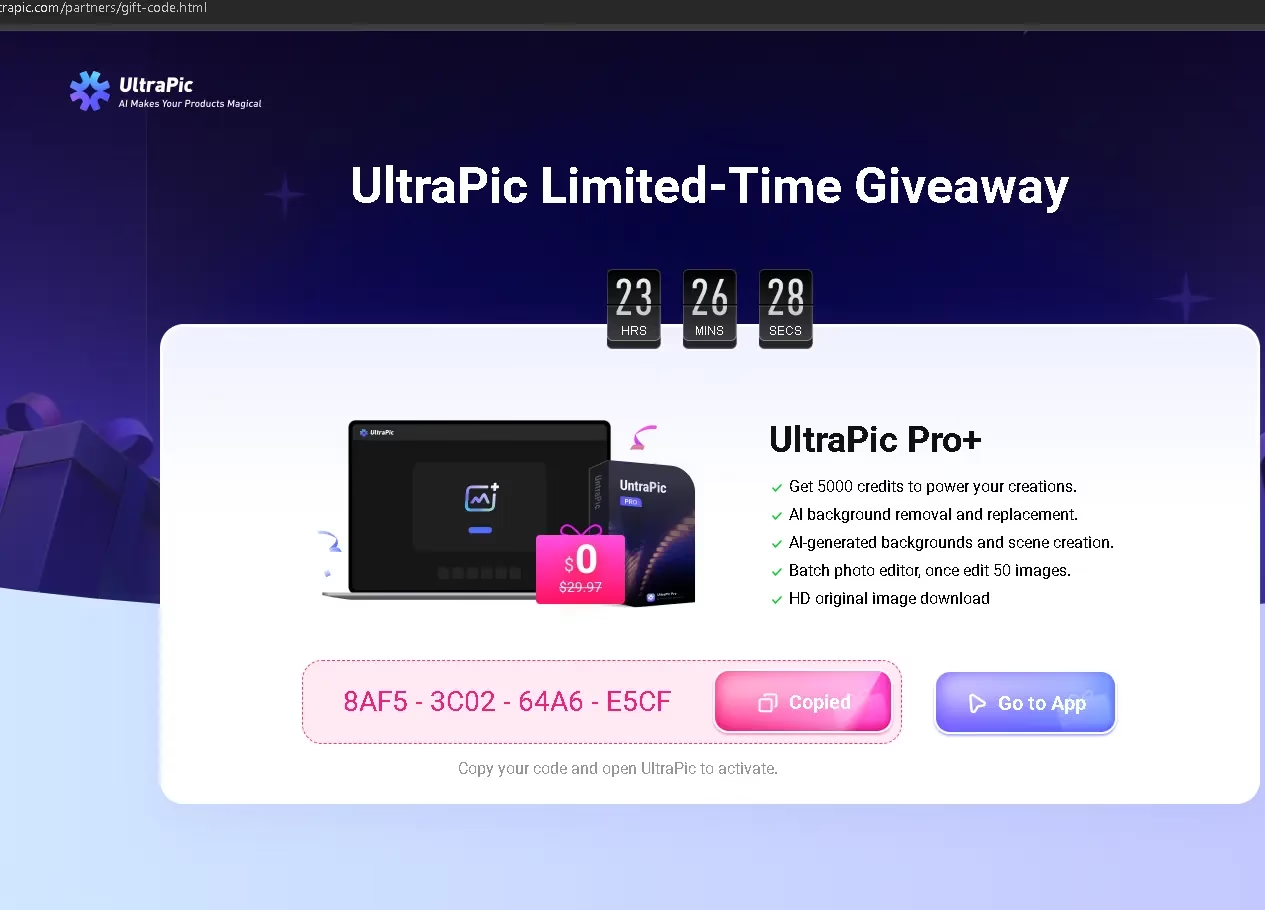

UltraPic Pro giveaway page showing the free activation code

How to Claim Your Free UltraPic Pro Code — Step by Step

The redemption takes under two minutes:

  1. Open the UltraPic giveaway page and click Copy to copy the activation code.
  2. Go to the UltraPic app at ultrapic.com/app and sign in with Google, Apple, or email (or create a free account).
  3. Click your profile avatar in the top-right corner and choose Enter Activation Code from the menu.
  4. Paste the code and click Activate.
  5. On the Activation Code Confirmation window, check that it shows Pro (90 days) and click Activate again.
  6. Done! Your account is upgraded to Pro straight away.

💡 Your remaining credit balance is shown under Account Settings → Credit Details. The same section shows when your credits expire.

Steps to redeem the UltraPic Pro activation code: sign in, enter activation code, confirm Pro 90 days


Who Is UltraPic Pro Best Suited For?

Based on the feature set, UltraPic Pro is a good fit for:

  • E-commerce sellers on Amazon, Flipkart, Meesho, Shopify, or Etsy who need clean, white-background product shots in bulk.
  • Content creators and bloggers who need quick image cleanup and background swaps for thumbnails and social posts.
  • Freelance designers who handle repetitive photo editing for clients and want a faster workflow.
  • Small business owners who can’t hire a photographer for every product update.
  • Social media managers who need polished visuals quickly, without a Photoshop subscription.

UltraPic Pro vs Free Plan — Is the Upgrade Worth It?

The free plan gives you 10 credits a week and only limited access to the AI background generator, retouching, generative fill, batch editing, magic eraser, and watermark remover. Pro removes those limits and adds a monthly credit allowance, so it is the plan that makes UltraPic practical for regular photo work.

Since this giveaway gives you 90 days of Pro completely free, it is an easy way to test the full toolset on your own product photos before deciding whether to pay.


Frequently Asked Questions

Is the UltraPic Pro giveaway really free?

Yes. The activation code is free to claim and redeem. You only need a free UltraPic account — no payment details are asked for during activation.

How long does the free UltraPic Pro licence last?

The activation screen shows Pro (90 days). Check Account Settings → Credit Details after redeeming for the exact expiry date of your credits.

When does the November 2026 giveaway end?

The official giveaway page says the offer expires in November, without a specific date. Claim and redeem your code as soon as possible.

Do I need to install anything?

No. UltraPic runs entirely in your web browser at ultrapic.com/app.

Will my exported images have a watermark?

No. UltraPic says neither the free nor the paid plans add brand watermarks to exported images.

The code didn’t work. What should I do?

Make sure you copied the full code from the giveaway page and are signed in. If it still fails, contact UltraPic support at support@ultrapic.com.

🎁 Claim Your Free UltraPic Pro Activation Code

Click the button below, copy your activation code, and follow the steps above to activate 90 days of UltraPic Pro:

👉 Claim Free UltraPic Pro Code (November 2026)

For questions about activation or credits, contact the UltraPic support team at support@ultrapic.com.


Final Verdict

UltraPic is a capable, browser-based AI photo editor that is especially useful for e-commerce and content work. The AI background generator and 50-image batch editor alone can save hours every week. With 90 days of Pro available for free, this giveaway is an easy win for anyone who edits images regularly.

Claim your code while it’s still active, put it to the test, and drop a comment below to let me know how it works for you!


Disclosure: This post includes a partner giveaway from UltraPic by AOMEI Technology. Readers receive the activation code for free. All opinions expressed are independent.

ظهرت المقالة Get UltraPic Pro Free for 90 Days – AI Photo Editor Giveaway (November 2026) أولاً على WKConquer | Discover Software, Games & Essential PC Tools.
Reçu — 13 novembre 2026 ⏭ Software License

Advanced SystemCare 20 Pro Free License Key (Pro Until 11 Feb 2027)

Par : Scorpio
13 novembre 2026 à 07:40

Fresh key, tested today: my PC switched to Pro with 91 days on the clock

I activated this new Advanced SystemCare 20 Pro license key on my own Windows PC on 12 November 2026, and License Manager changed to Activated. Pro runs until 11 February 2027 (that’s 90 days from today). The end date stays the same whenever you activate, so every day you wait is a day of Pro you lose.

Your giveaway license code

8A67C-9FFD8-329ED-98AI4

I’ve been writing about Advanced SystemCare on wkconquer.com for years, and every autumn or so IObit bumps the version number. Most years the change is a fresh coat of paint. Version 20 is a bit different: the headline feature is a proper disk-space cleaner, which is what most people want from a tool like this when their C drive turns red.

This page used to cover version 19. Rather than leave you with an old build and old codes, I’ve rewritten it around version 20: new screenshots from my own PC, a fresh Pro key that I activated before publishing, and honest notes on which parts are worth your time.

🔄 What changed on this page (12 Nov 2026): a new Pro code that runs until 11 February 2027 replaces the previous key, and there’s a fresh activation screenshot from my PC. Earlier update (18 Oct 2026): rewritten for Advanced SystemCare 20 with all-new screenshots and the version 19 keys removed.

What’s new in Advanced SystemCare 20

IObit announced version 20 on 9 September 2026. Strip away the press-release language and there are three real changes.

1. Custom Clean: finally, a space finder built in

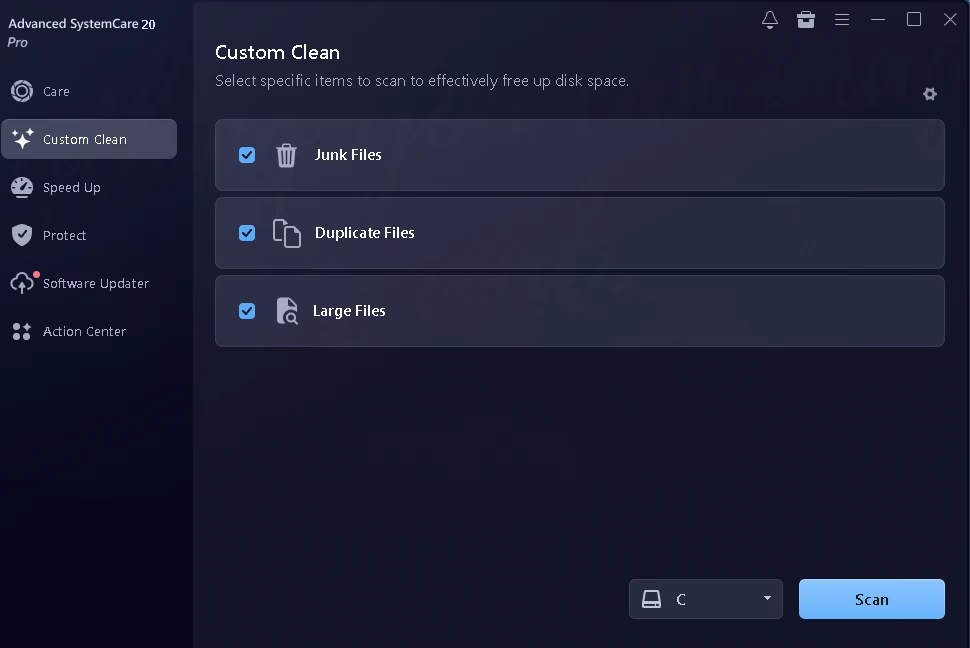
There’s a new Custom Clean tab in the sidebar with three ticks: Junk Files, Duplicate Files and Large Files. You pick a drive from the dropdown and hit Scan. According to IObit, the large-file pass hunts for bulky videos, disk images, ISO files and forgotten installers in places like Downloads and Documents, and you can preview them before anything is deleted. The duplicate finder keeps one copy of each identical photo, video, document or song.

In older versions, Large File Finder and Duplicate File Finder were buried in the toolbox. Putting them on the main sidebar is a small change that makes a big difference, because now people will actually use them.

Advanced SystemCare 20 Pro Custom Clean tab with Junk Files, Duplicate Files and Large Files options and drive selector
The new Custom Clean tab. All three checks are ticked by default, and the drive dropdown sits next to the Scan button.

My advice: treat the large-file results as a shopping list, not a delete button. An ISO you downloaded last year is probably safe to bin. A large video in Documents might be the only copy of your kid’s school function. Read the list before you clear it.

2. A rebuilt scan engine

IObit calls it Smart Scan. Instead of checking one module after another, it runs several at the same time, and IObit says it flags fewer false positives. The big SCAN button on the Care tab still gives you AI Mode (it decides what to check) or Manual Mode (you tick the boxes). On my PC the scan felt quicker than version 19, but I didn’t time either run, so I won’t quote you a number. How long it takes depends heavily on how cluttered your drive is.

3. Network speed and disk temperature monitoring

IObit says version 20 adds a live upload/download readout, handy for catching a background app quietly eating your bandwidth, and a disk-temperature monitor that warns you before a drive runs hot. The Performance Monitor was set to load at Windows startup on my install. If you’d rather keep your system tray tidy, you can turn it off under Settings → General Settings.

My hands-on test with the Pro key

I tested on my everyday Windows PC, not a fresh virtual machine. That matters, because a clean test install always looks great. A machine that’s been in daily use for months is where you see whether a cleaner earns its place.

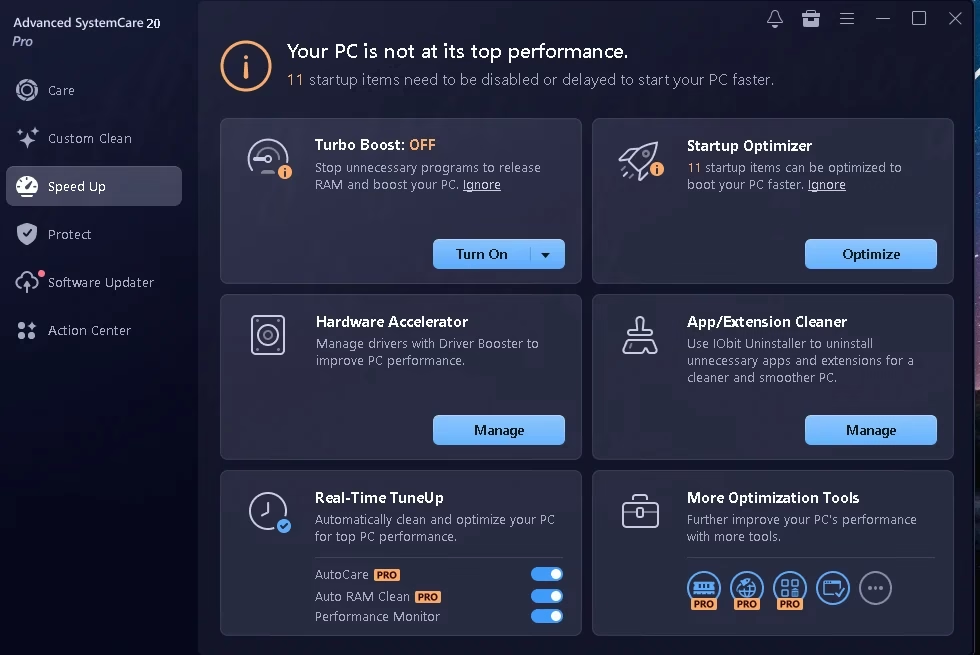
Speed Up: 11 startup items flagged

The Speed Up tab told me 11 startup items could be disabled or delayed. Startup Optimizer is the tile I’d open first, because trimming startup apps is the change most likely to shorten boot time. Turbo Boost was off out of the box. It pauses background programs to free up RAM, which helps during a game or a heavy export, but you don’t need it running all day.

Two tiles are really shortcuts to other products. Hardware Accelerator opens Driver Booster, and App/Extension Cleaner opens IObit Uninstaller. If you want the full Driver Booster experience, we have a Driver Booster 14 Pro giveaway with a key that runs until 29 March 2027.

Advanced SystemCare 20 Pro Speed Up tab showing Turbo Boost off and Startup Optimizer with 11 startup items
11 startup items flagged on my machine. With Pro active, AutoCare and Auto RAM Clean in Real-Time TuneUp are switched on.

Software Updater: the part I’d pay for

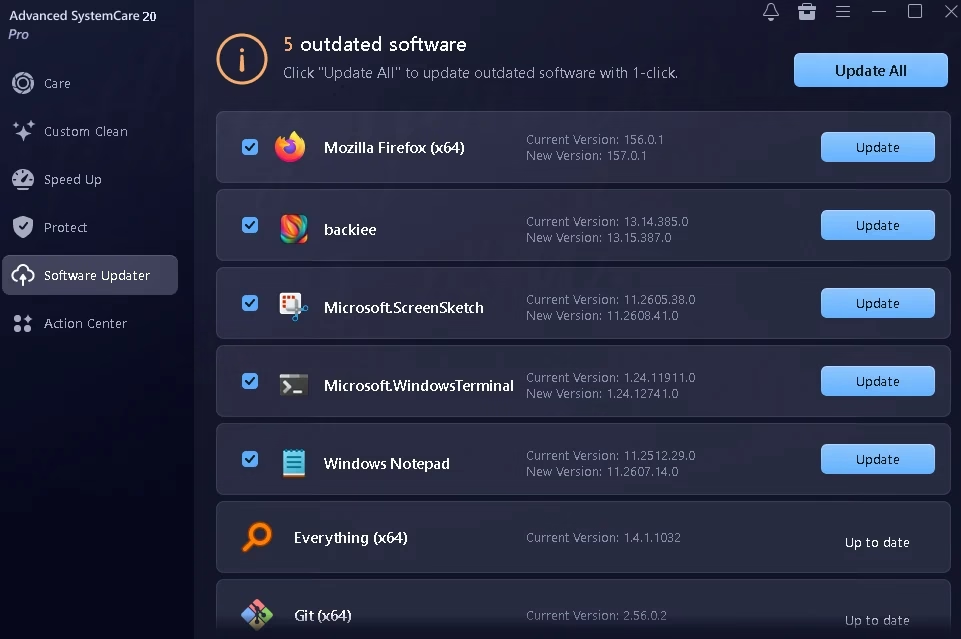
This is still the most useful thing in the suite. It found five outdated programs: Mozilla Firefox, the backiee wallpaper app, Windows Terminal, Windows Notepad and Microsoft’s ScreenSketch package (that’s the Snipping Tool). It also marked Everything and Git as up to date, which they were, so no false alarms.

Notice that three of those five are Microsoft Store apps. Plenty of updaters ignore Store apps entirely, so this is a real plus. Out-of-date software is a common way in for malware, and this catches it without you opening each app’s About box. I’d still glance down the list before clicking Update All, just to make sure nothing you deliberately kept on an older version gets bumped.

Advanced SystemCare 20 Software Updater listing 5 outdated apps including Firefox, Windows Terminal and Notepad
Five updates found, including three Microsoft Store apps. Everything and Git correctly shown as current.

Protect: useful toggles, plus a VPN pitch

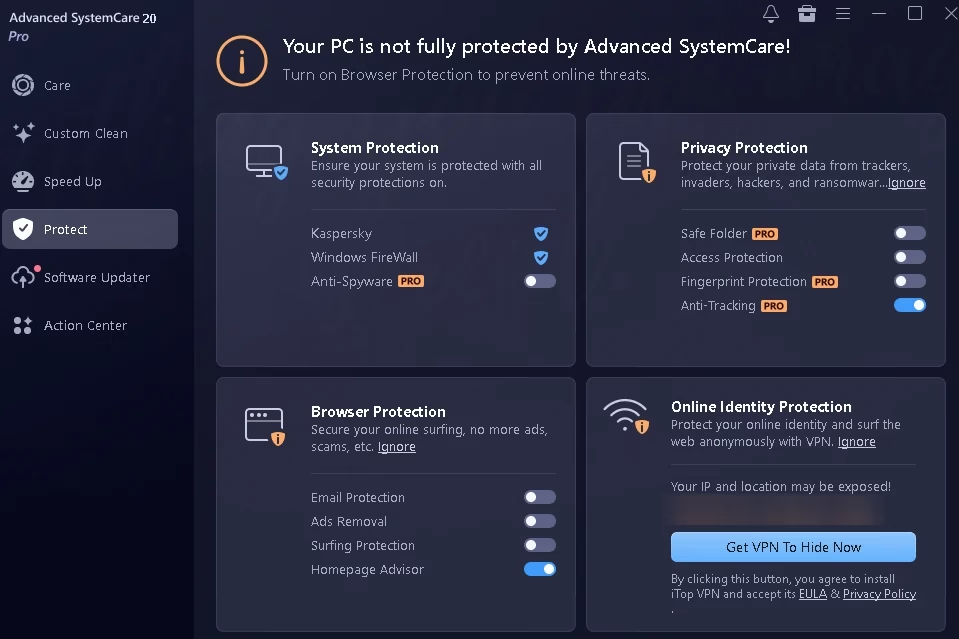
The Protect tab picked up my existing Kaspersky install and Windows Firewall straight away, which is reassuring: it isn’t trying to replace your antivirus. Under Privacy Protection you’ll find Safe Folder (a locked folder for sensitive files), Fingerprint Protection, Access Protection and Anti-Tracking. Only Anti-Tracking was on after activation. If you keep scanned ID cards or tax papers on your PC, Safe Folder is worth a few minutes to set up. Just remember it’s a Pro feature and this key has an end date (more on that in the FAQ).

The bottom-right card is an ad. It shows your public IP address and town, then offers a Get VPN To Hide Now button that installs iTop VPN. Skip it unless you actually want that VPN. If you ever share a screenshot of this tab, blur that line first, as I have below.

Advanced SystemCare 20 Protect tab with System Protection, Privacy Protection, Browser Protection and Safe Folder options
It detected my existing antivirus and firewall. The VPN card at the bottom right is optional (IP address and town blurred).

One setting I’d change right away

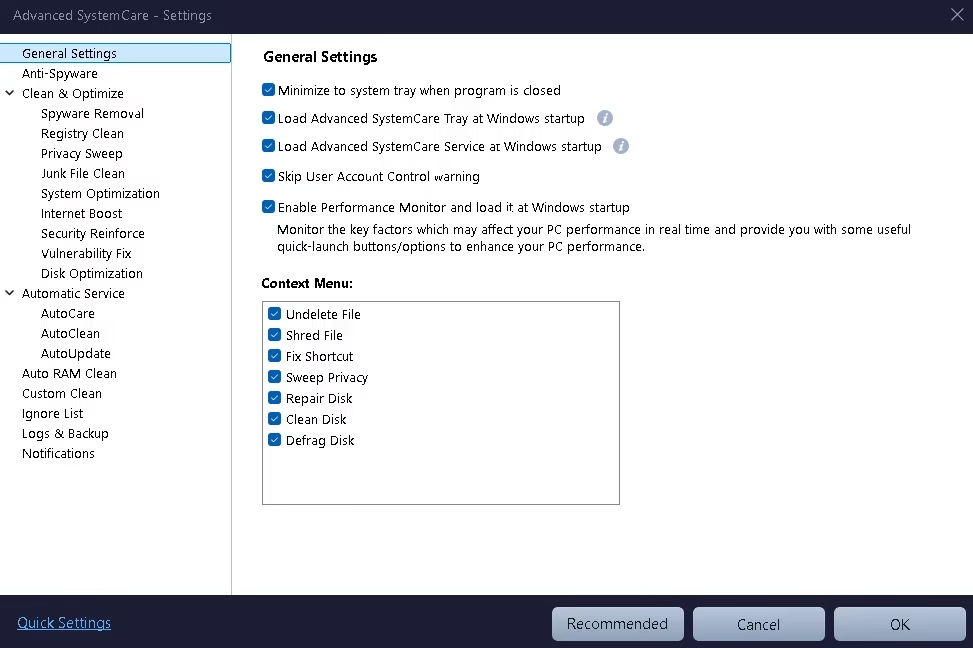
Open ☰ menu → Settings → General Settings. Most of the boxes there are harmless: minimise to tray, load at startup, run the Performance Monitor. But “Skip User Account Control warning” was ticked on my install. UAC is the Windows prompt that asks before a program makes system-level changes. I’d rather see that prompt, so I unticked it. It costs you one extra click now and then, and it’s one less shortcut around a Windows safety check.

The same page lets you trim the right-click menu. Advanced SystemCare adds seven entries (Undelete File, Shred File, Fix Shortcut, Sweep Privacy, Repair Disk, Clean Disk and Defrag Disk). If your context menu already feels crowded, untick the ones you’ll never use.

Advanced SystemCare 20 General Settings with Skip User Account Control warning option and context menu entries
I’d untick “Skip User Account Control warning”. The context-menu list below it is yours to trim.

Right after you activate Pro, a pop-up offers an Enable all features button. Most of what it turns on is fine, but notice that Registry Deep Clean and Secure File Deletion stay off. That’s the right call. Registry cleaning brings little benefit on modern Windows, and secure deletion (DoD 5220.22-M overwriting) is slow and only needed when you’re getting rid of truly sensitive files.

Giveaway details at a glance

Product Advanced SystemCare 20 Pro by IObit
License code 8A67C-9FFD8-329ED-98AI4
Pro until 11 February 2027, a fixed end date (90 days left today)
Last tested 12 November 2026: activated on my PC with 91 days of Pro left
Activation limit Not disclosed; treat it as first come, first served
Works on Windows 11, 10, 8/8.1, 7, Vista and XP
Normal price $29.99/year for 1 PC on IObit’s US store, often discounted (checked 18 Oct 2026; prices vary by region). 60-day money-back guarantee.
Antivirus included? No. That’s Advanced SystemCare Ultimate.

Free vs Pro: what the key actually gets you

The free edition handles the basics: startup cleanup, junk removal and one-click RAM release. Here’s what switches on once the giveaway key is in, based on IObit’s own comparison and what I saw in the app:

Feature Free Pro (this key)
Junk cleaning and startup optimisation ✔ ✔
RAM release Manual Automatic
One-click update of outdated software — ✔
Safe Folder for sensitive files — ✔
Anti-Tracking and Fingerprint Protection — ✔
AutoCare, AutoUpdate and deeper cleaning — ✔
Premium technical support — ✔

Want antivirus in the same window? Advanced SystemCare Ultimate bundles these tools with a Bitdefender-based scanner, and our Advanced SystemCare Ultimate 18 review covers it in detail, though that giveaway’s activation window closed on 2 November 2026.

How to activate the free Advanced SystemCare 20 Pro license

  1. Download the free edition from IObit’s official Advanced SystemCare page. Avoid mirror sites.
  2. Run the installer and choose Custom install. Untick any extra IObit apps you don’t want.
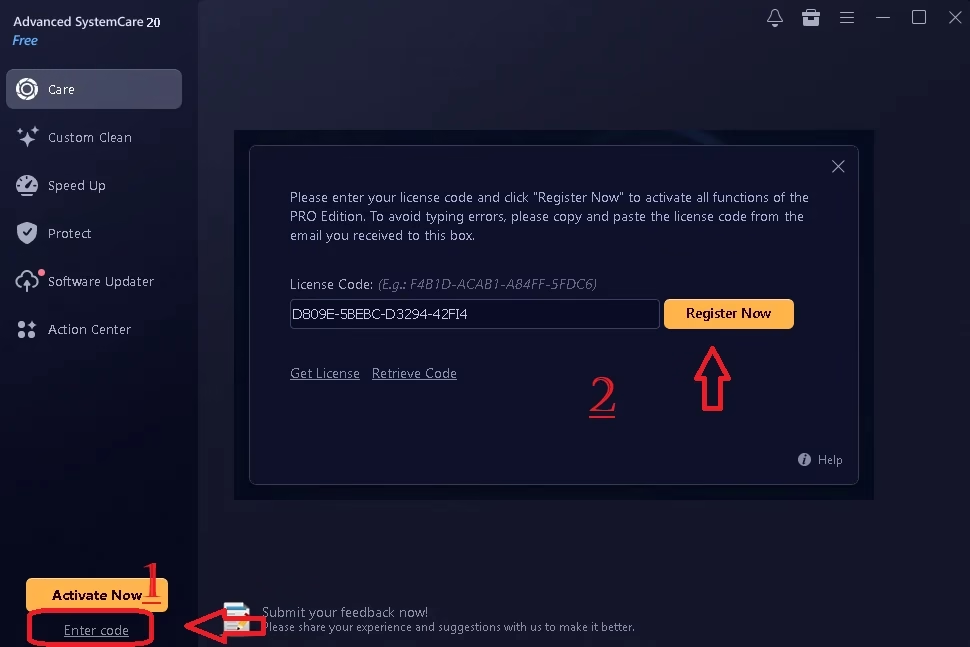
  3. Open the program. Below the orange Activate Now button at the bottom left, click Enter code.
  4. Paste 8A67C-9FFD8-329ED-98AI4 into the box. Copy and paste it rather than typing.
  5. Click Register Now. The label under the program name switches from “Free” to “Pro”.
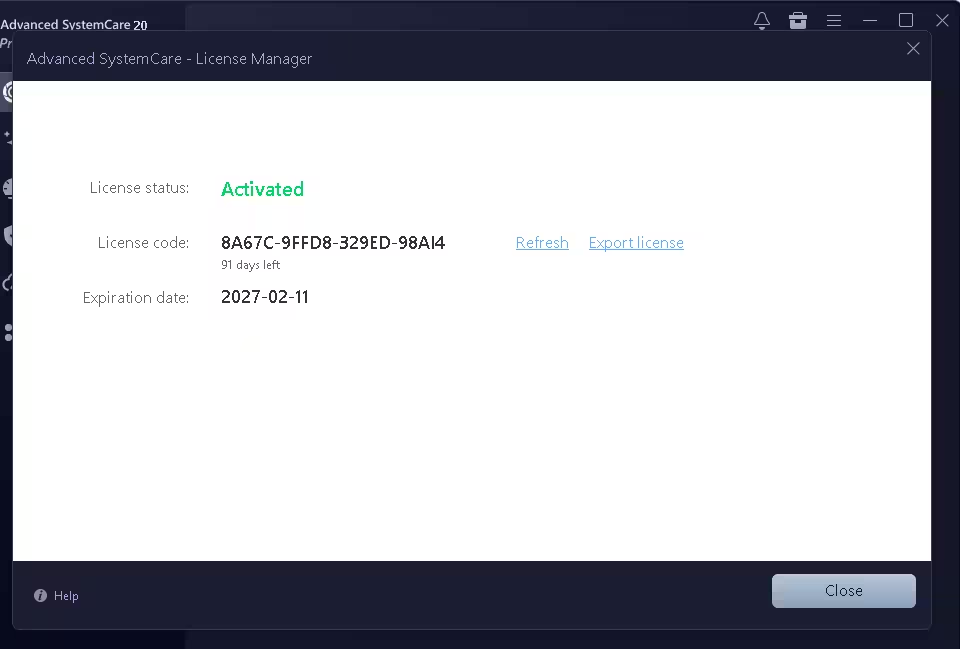
  6. To double-check, open ☰ menu → My Subscription. You should see License status: Activated and an expiration date of 2027-02-11.
Entering an Advanced SystemCare 20 Pro license code in the Enter code box and clicking Register Now
Step 1: click “Enter code”. Step 2: paste the key and click “Register Now”. (This screenshot shows the previous code. Paste the new one from the box above.)
Advanced SystemCare 20 License Manager showing code 8A67C-9FFD8-329ED-98AI4 activated with 91 days left and expiration date 2027-02-11
Proof it works: activated on my PC on 12 November 2026, with Pro running until 11 February 2027 (91 days left on the day I tested).

⚠ Code rejected? First, check you copied all 23 characters, including the three

ظهرت المقالة Advanced SystemCare 20 Pro Free License Key (Pro Until 11 Feb 2027) أولاً على WKConquer | Discover Software, Games & Essential PC Tools.
Wise Data Recovery Pro Free Giveaway: v6.2.2.520 Pre-Activated (2026)

Par : Scorpio
13 novembre 2026 à 07:39

Wise Data Recovery Pro is WiseCleaner’s file undelete tool for Windows. It does one job: it finds files you deleted, emptied from the Recycle Bin, or lost to a quick format, and copies them back to a safe place. It’s small, it doesn’t try to be a full disk-repair suite, and you can be scanning within a minute of opening it.

WiseCleaner sells Pro for $39.97 a year for one PC (or $49.99 a year for three). This giveaway build gives you the same Pro edition for free. I’ve rewritten this page around the new 6.2.2.520 giveaway installer, with fresh screenshots from my own PC, and removed the old download links that no longer apply.

🔄 What changed on this page (13 Nov 2026): a new direct download for the 6.2.2.520 giveaway build replaces the old SharewareOnSale and VideoProc links. I added new screenshots of the activated About window, the drive picker and a finished scan, and updated the free-vs-Pro details to match WiseCleaner’s current product page.

Wise Data Recovery Free vs Pro: what the giveaway unlocks

The free and Pro editions use the same scan engine. The difference is how much you’re allowed to bring back. Here’s how WiseCleaner’s own product page lays it out:

Feature Free edition Pro (this giveaway)
Recoverable data Up to 2 GB Unlimited
Scan by file type, path or keyword Yes Yes
Drives and devices HDD, SSD, USB, SD card, external drives Same
File systems FAT, exFAT, NTFS, HFS/HFS+/HFSX, Ext2/Ext3 Same
Price Free $0 here (normally $39.97/year)

In plain terms: if you only ever need to rescue a handful of Word files, the free edition is enough. The 2 GB cap starts to hurt when you’re recovering phone videos, RAW photos from a camera card, or a whole project folder. That’s where this giveaway pays off.

Proof it’s activated: the About window

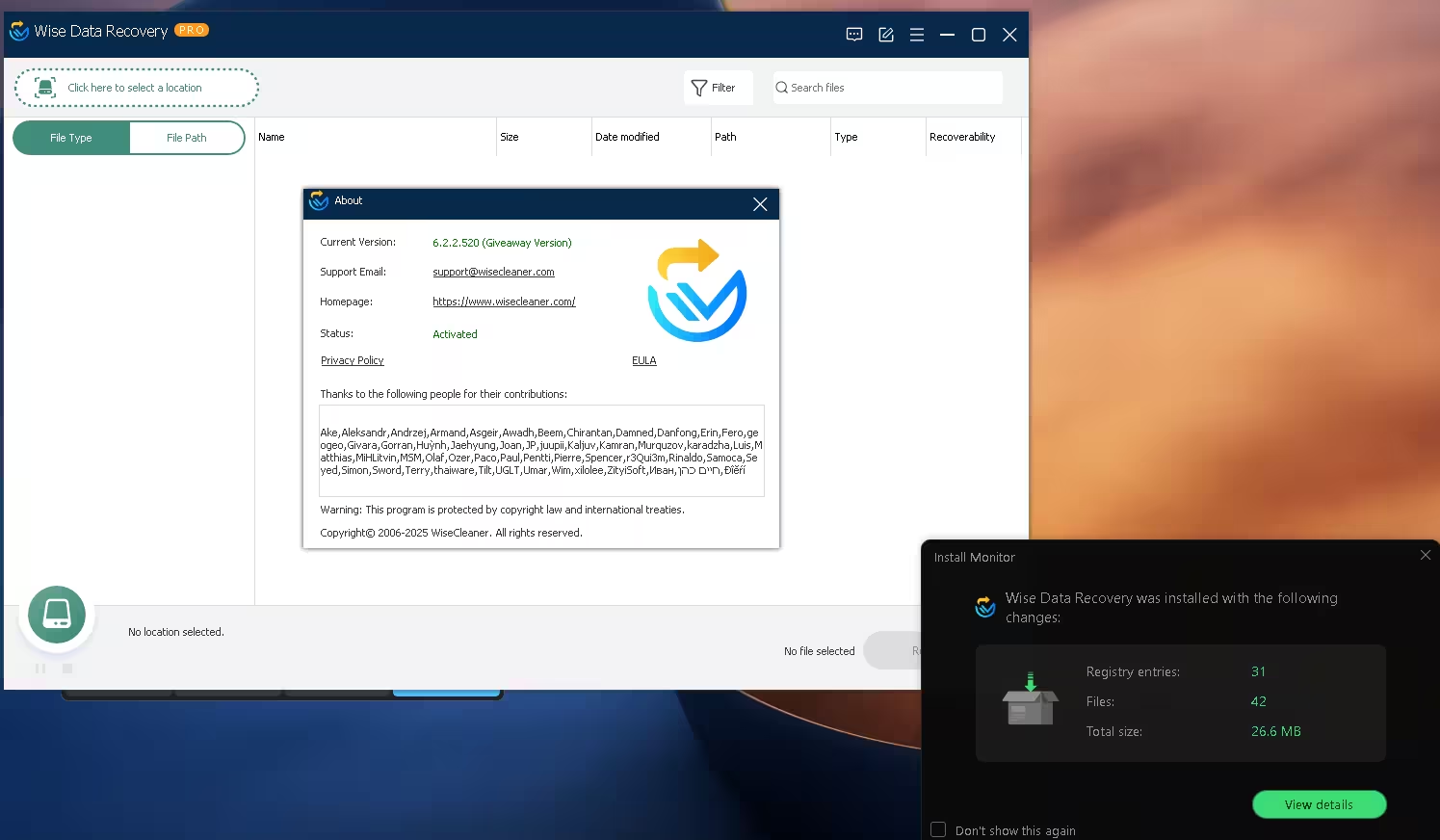
Right after installing, I opened the About window from the menu. It lists the version as 6.2.2.520 (Giveaway Version) and the status as Activated, and the title bar shows the orange PRO badge. I didn’t enter anything to get there.

Wise Data Recovery Pro About window showing version 6.2.2.520 Giveaway Version with status Activated
The About window on my PC: version 6.2.2.520 (Giveaway Version), status Activated. The install monitor in the corner logged a 26.6 MB install.

The install itself is light. My install monitor recorded 42 files and 31 registry entries, 26.6 MB in total. The installer didn’t offer any toolbars or extra apps.

One thing I can’t confirm is how long the activation lasts. The About window doesn’t show an end date, and other giveaway sites describe this build as either a one-year or a lifetime license. What I can say is that it showed Activated on 13 November 2026. If WiseCleaner adds an end date later, I’ll update this page.

How to install the Wise Data Recovery Pro giveaway

⬇ Giveaway download

File: Wise_Data_Recovery_Pro_V6.2.2.520-GIVEAWAY.exe · Size: about 10.6 MB · Works on: Windows 11, 10, 8 and 7 (32-bit and 64-bit)

  1. Install it on a different drive from the one with your lost files. If you deleted files from C:, install to D: or another drive if you can. Every write to the affected drive can overwrite the data you’re trying to save.
  2. Run the installer and follow the standard setup screens.
  3. Open Wise Data Recovery. The PRO badge should appear next to the name in the title bar.
  4. Check the About window (menu icon at the top right). You should see “Giveaway Version” and “Activated”.
  5. Skip updates. If the program offers a newer version, ignore it. Updating can replace the giveaway build with the regular free edition.

How to recover deleted files with Wise Data Recovery Pro

1. Pick a location to scan

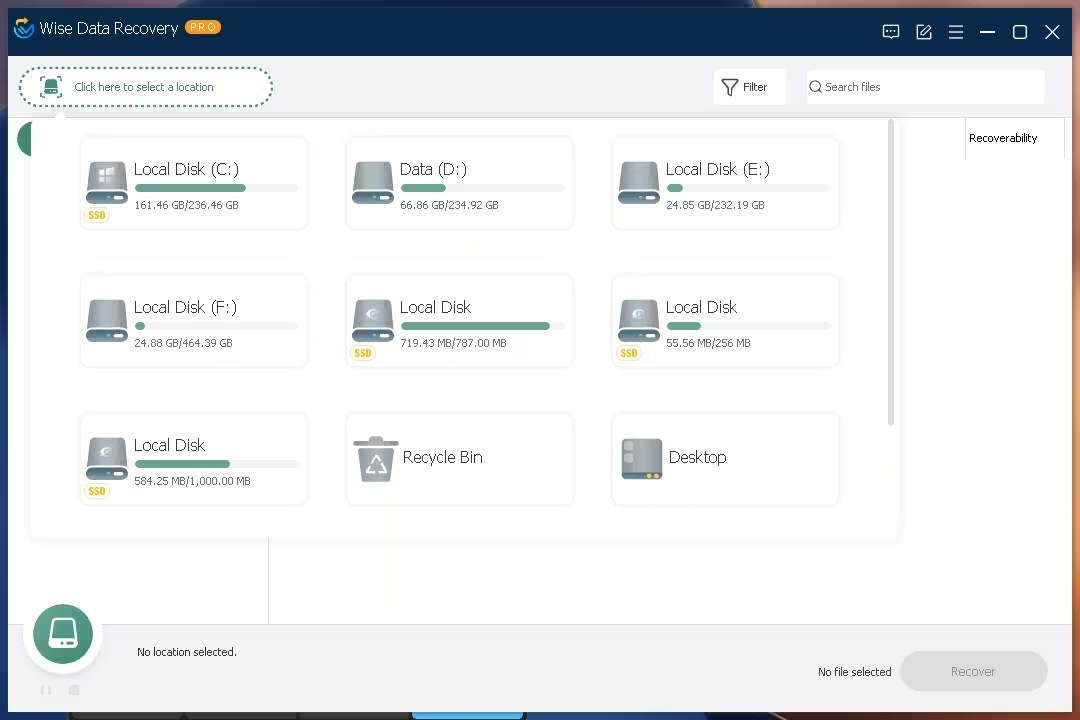
Click Click here to select a location at the top left. A panel opens with every drive Windows can see, each with a usage bar and an SSD tag where it applies. You’ll also see two handy shortcuts: Recycle Bin and Desktop. If you know roughly where the file was, use those to cut scan time.

Wise Data Recovery Pro location picker listing local disks, SSD partitions, Recycle Bin and Desktop for scanning
The location picker on my PC: every partition, plus Recycle Bin and Desktop shortcuts.

2. Browse the results by file type or path

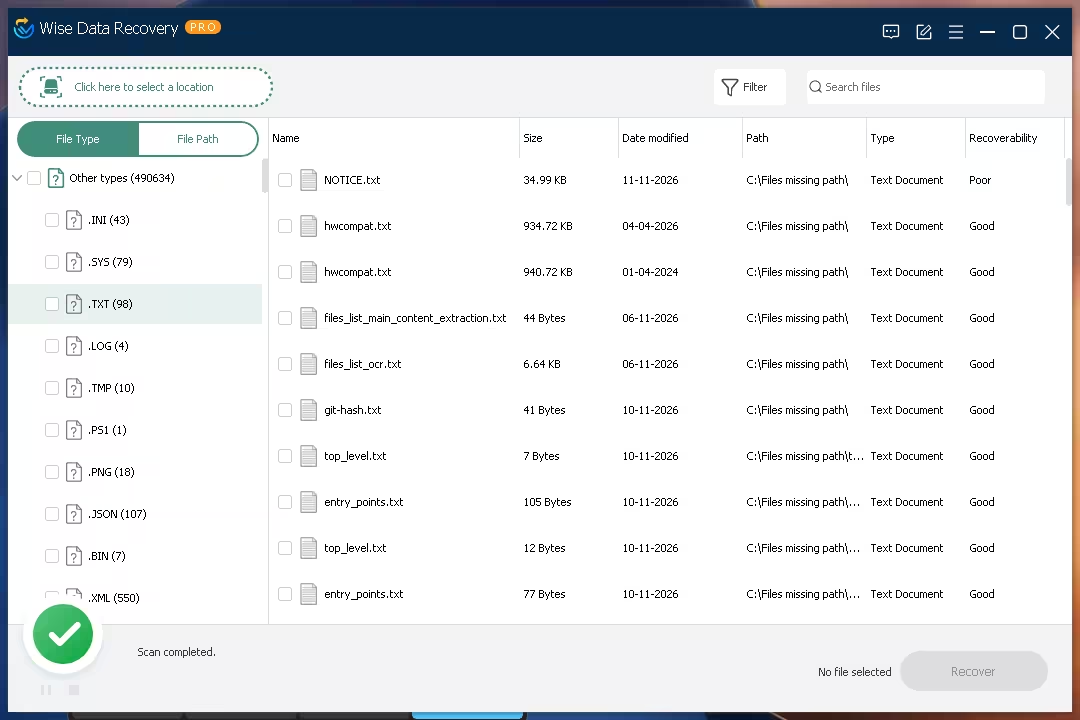
When the scan finishes, the left pane splits results into File Type and File Path tabs. File Type groups everything by extension (.TXT, .PNG, .JSON, .XML and so on), with a count beside each. File Path rebuilds the folder tree, which helps when you know the folder the file was in.

The main list shows each file’s name, size, date modified, original path, type and a Recoverability rating. On my C drive, the “Other types” group alone held 490,634 files. Files the scanner couldn’t match to a folder are listed under “Files missing path”. Use the Search files box or the Filter button to narrow a list that big.

Wise Data Recovery Pro scan results grouped by file type with size, date, path and Good or Poor recoverability ratings
Scan complete: results grouped by file type, each with a Good or Poor recoverability rating.

3. Recover to a safe folder

Tick the files you want and click Recover at the bottom right. Choose a folder on a different drive, or on a USB stick, so recovered files don’t overwrite ones you haven’t saved yet. Start with files marked Good. Files marked Poor have been partly overwritten and may open damaged, or not at all.

What file types can it recover?

WiseCleaner says the engine recognises more than 1,000 formats. The main groups:

  • Documents: DOC/DOCX, XLS/XLSX, PPT/PPTX, PDF, TXT and more
  • Photos: JPG, PNG, GIF, BMP, TIFF, PSD and camera RAW formats such as CR2, NEF, ORF, RAF and DNG
  • Videos: MP4, MOV, AVI, MKV, WMV, FLV, 3GP, MPEG and more
  • Audio: MP3, WAV, WMA, M4A, AAC, OGG, AIFF and more
  • Email: Outlook PST, Outlook Express DBX and Apple Mail EMLX
  • Other: ZIP, RAR, ISO and other archives, plus EXE and HTML files

Pros and cons

👍 What I liked 👎 What could be better
Pre-activated: no key, no account, no email Windows only, with no Mac or phone version
Small install (26.6 MB on my PC), and no bundled extras Giveaway builds can’t be updated without losing Pro
Recycle Bin and Desktop shortcuts save scan time A full drive scan can return hundreds of thousands of files, so you’ll lean on search and filters
Good/Poor rating tells you what’s worth recovering No disk imaging or partition repair. Badly damaged drives need a heavier tool

Wise Data Recovery Pro vs free alternatives

Feature Wise Data Recovery Pro (giveaway) Recuva Free Windows File History
Recovers files with no prior backup Yes Yes No, it only restores what it backed up earlier
Recovery limit None None Size of your backup
Ease of use Pick a drive, scan, recover Wizard-based, older interface Built in, but must be set up before you lose anything
Cost Free with this giveaway Free Free, part of Windows


Is the Wise Data Recovery Pro giveaway worth grabbing?

Yes. It’s a 10.6 MB download, it installs already activated, and it removes the one real limit of the free edition. The interface is about as simple as recovery software gets: pick a drive, scan, tick, recover.

Get it if you want a recovery tool ready before something goes wrong, especially for photos, videos and USB sticks. Look elsewhere if your drive is physically failing or the partition is gone. That needs a tool with disk imaging, or a professional lab.

Frequently asked questions

Do I need a license key for this Wise Data Recovery Pro giveaway?

No. The 6.2.2.520 giveaway build is pre-activated. Install it and the About window shows “Activated” straight away.

Is this a cracked version?

No. It’s WiseCleaner’s own giveaway build, labelled “Giveaway Version” inside the program. Nothing is patched.

What’s the difference between Wise Data Recovery Free and Pro?

The free edition recovers up to 2 GB of data. Pro has no limit. Both use the same scanner and support the same drives and file types.

Can I update the giveaway version?

I wouldn’t. Giveaway builds are tied to their version number, and installing a newer release can turn it back into the free edition. Stay on 6.2.2.520.

Does “deleted” mean a file is gone forever?

Usually not right away. Windows marks the space as free, but the data stays on the drive until something new is written over it. That’s why you should stop using the drive and scan as soon as possible. On SSDs with TRIM turned on, deleted data can be wiped quickly, so the odds there are lower. Our guide on how to recover deleted files on Windows 11 for free covers the built-in options as well.

Does it work on Windows 11?

Yes. WiseCleaner lists Windows 11 and 10 plus older versions back to XP, in both 32-bit and 64-bit.


ظهرت المقالة Wise Data Recovery Pro Free Giveaway: v6.2.2.520 Pre-Activated (2026) أولاً على WKConquer | Discover Software, Games & Essential PC Tools.
Reçu — 12 septembre 2026 ⏭ Software License

Wise Care 365 Pro 8 Giveaway: Free Full Version with Lifetime License

Par : Scorpio
8 août 2026 à 20:32
Wise Care 365 Pro 8 free full version giveaway
Wise Care 365 Pro 8 (build 8.0.4.732) is being handed out as a pre-activated full version with a lifetime license.

⚡ Quick Read — 30 Seconds

  • What: Wise Care 365 Pro 8 (build 8.0.4.732) — WiseCleaner’s flagship cleanup, tune-up & privacy suite for Windows.
  • The deal: A special installer that arrives fully unlocked. No serial, no email sign-up, no registration screen.
  • License: Lifetime on this build — but it stays on 8.0.4.732 (no free upgrades, no official support, personal use).
  • Works on: Windows 11, 10, 8.1 and 7 (32 & 64-bit).
  • Why bother: On our test PC, the first scan flagged 76,000+ items and 13.43 GB of reclaimable junk in under 90 seconds.

Why This Giveaway Caught Our Attention

Every Windows machine slowly fills up with leftovers — browser caches, orphaned registry entries, temp folders that nobody ever empties, and traces of every file you’ve opened since 2023. You can chase all of that down by hand, or you can let one app sweep the whole house in a couple of clicks. That’s the pitch behind Wise Care 365, and it has been WiseCleaner’s headline product for years.
The Pro edition normally sits behind a paywall, which is why this promotion is worth a few minutes of your day: the build being handed out is the current release (8.0.4.732), not some ancient version dug out of an archive, and the Pro unlock is baked right into the installer. Grab it, run it, done.
We put it through its paces on our own machine before writing this up — the screenshots below are from our test system, not press material.

Wise Care 365 Pro 8 PC Checkup scan results
PC Checkup after the first scan: 76,704 items and 13.43 GB of reclaimable junk found in 1 minute 18 seconds.

What You Get in Wise Care 365 Pro 8

🖥 PC Checkup — the one-click health report

This is the landing screen and the feature most people will live in. Hit the big button and the suite audits five areas at once: privacy traces, security settings, useless files, tune-up opportunities, and browsing history. Our first pass finished in 1 minute 18 seconds and surfaced 13.43 GB of removable clutter — mostly cache files and old logs we’d forgotten existed. One more click wipes the lot.

🧹 System Cleaner — registry and junk, handled properly

Under the hood you’ll find the Registry Cleaner (which checks 17+ categories from ActiveX components to MUI cache), a Common Cleaner for everyday junk, an Advanced Cleaner for deep scans, System Slimming, and a Big Files Manager for hunting down the space hogs on your drive. Version 8.0.4 also picked up fresh cleanup rules for newer apps — think Grammarly, Cursor, Perplexity, Docker Desktop and DeepL — so it understands the junk modern software leaves behind, not just the classics.

Wise Care 365 Pro 8 registry cleaner categories
System Cleaner > Registry Cleaner covers everything from ActiveX/COM components to the MUI cache.

🚀 System Tuneup — squeeze more speed out of Windows

The tune-up tab bundles a System Optimizer, Disk Optimizer, Registry Defrag, Startup Manager, Context Menu editor, Game Booster and Disk Repair. The optimizer works through sensible toggles — faster shutdowns, blocking Insider preview builds for stability, auto-restarting Explorer if it crashes — and labels each one so you can see exactly what’s already tuned. A notable addition in this release: a Disable Remote Assistance switch under System Security and Privacy that shuts the door on unwanted remote connections.

Wise Care 365 Pro 8 system tuneup optimizer
System Tuneup > System Optimizer labels every tweak as Optimized or Unoptimized so nothing is a guess.

🔒 Privacy Protector — cover your tracks

The Privacy Eraser clears four trails your PC quietly records: pictures you’ve viewed, videos you’ve watched, files you’ve opened, and pages you’ve visited. Alongside it sit a Disk Eraser (wipes free space so deleted files stay deleted), a proper File Shredder, a Password Generator, and a Web Notifications blocker. If privacy tools are your thing, our Ashampoo Privacy Inspector giveaway pairs nicely with this one.

Wise Care 365 Pro 8 privacy eraser
Privacy Protector > Privacy Eraser wipes four separate tracking trails in one pass.

📊 System Monitor — see what’s eating your resources

A clean process monitor lists every running task with its location, CPU and memory footprint, plus tabs for your operating system details, a hardware overview, and an activity timeline. It won’t replace a full task manager for power users, but for a quick “what’s hogging my RAM?” check, it’s genuinely handy.

Wise Care 365 Pro 8 process monitor
System Monitor > Process Monitor listing all 250 active processes with CPU and memory usage.

🧰 Bonus utilities in the sidebar

The right-hand panel hides a small toolbox of its own: an Image Editor, Data Recovery, Duplicate Finder, Folder & File Hider, Force Deleter for stubborn files, Auto Shutdown scheduler, Memory Optimizer, Program Uninstaller and a Reminder/Note tool. There’s even a floating desktop widget showing live RAM and CPU usage, with a right-click menu for the Game Booster and quick settings.

Wise Care 365 floating CPU RAM widget on Windows taskbar
The floating widget sits on the desktop, and the tray menu gives you Game Booster and quick settings.

How to Get Wise Care 365 Pro 8 Free

The unlocked installer is mirrored on three hosts — pick whichever loads fastest for you:

📥 Download Wise Care 365 Pro 8.0.4.732 (Giveaway Build)

💡 File: WiseCare365_8.0.4.732_Giveaway.exe · Size ≈ 36 MB · No key required — the Pro unlock happens automatically during setup.

Installation — three steps, no key hunting

  1. Download the setup file from any mirror above.
  2. Run the installer and click through the setup like any normal Windows program.
  3. Launch it. You’ll see the orange PRO tag next to the version number in the title bar — that’s your confirmation. Nothing to type, nowhere to register.

Giveaway Terms — Read Before You Install

Condition Details
Software version 8.0.4.732 (current release)
License duration Lifetime — activation never expires on this build
Future updates / upgrades Not included — updating to a newer version drops you back to trial mode
Official tech support Not included
Usage Personal / home use only — not for business machines

Our tip: once installed, head into Settings and switch off automatic update checks. That keeps the app from nudging you toward a version that would undo your free Pro status.

ظهرت المقالة Wise Care 365 Pro 8 Giveaway: Free Full Version with Lifetime License أولاً على WKConquer | Discover Software, Games & Essential PC Tools.
Leawo Video Converter Pro Free 1 Year License[Windows & Mac]

Par : Scorpio
8 août 2026 à 20:31

Leawo Video Converter enables users to convert between video and audio files in over 180 different formats.

This application can convert audio and video clips (AVI, MOV, MP4, MP3, and WAV) to a variety of different formats, including MP4, AVI, RM, and AC3.

Apart from supporting various video and audio formats, Leawo Video Converter allows you to directly set the output profile for various portable devices. This professional video file converter supports iPod, iPhone, iPad, Android, Microsoft devices, Xbox, and PSP.

In addition to converting video and audio files, this Leawo software can create photo slideshow videos by importing photos and photo folders and transforming them into video slideshows.

Adjustment of the photo slideshow effect is available. Users can customize the output video effect, the order of the photos, the background music, and the output audio effect.

Leawo Video Converter module

This Video Converter features an intuitive interface, multilingual support, and additional features such as 2D to 3D conversion, external subtitle support, and selectable audio tracks, among others.

Using the file browser or tree view, you can easily import videos into the program. At the same time, multiple items can be processed.

The file queue shows the name, original and trimmed length (unless you want to cut clips), estimated size, and output format for each file. After selecting the output directory and profile, you can begin the encoding process by leaving everything in its default settings.

However, more advanced users can modify the codec, quality, size, bit rate, frame rate, aspect ratio, sample rate, and channel mode of audio and video. It is possible to save settings to a new profile.

With the built-in media player, you can preview and take screenshots (as PNG, BMP, or JPG ).


Get Leawo Video Converter for Free:

Visit this giveaway page.

Simply click on either the “Get Now” button with the Windows logo or the “Get Now” button with the macOS logo, depending on which operating system (OS) your computer uses.

After that, provide your name and email address, and click the “Get It Now” button. On the giveaway page, you will find the license code and a link to download the software installer.

You can also check your email inbox for the license code, as you will receive an email from Leawo Software.

Windows users can download the installer from here, whereas macOS users can download the setup file from here.

Once you have downloaded the installer, proceed to install the software.

Click the “Key” icon on the main screen once the application has launched. Enter the license code and click the right arrow button to unlock the full version.

Leawo Video Converter Pro 13 License Code

ظهرت المقالة Leawo Video Converter Pro Free 1 Year License[Windows & Mac] أولاً على WKConquer | Discover Software, Games & Essential PC Tools.
Abelssoft CheckDrive 2026 Full Version for Free [Drive Diagnostic Software]

Par : Scorpio
8 août 2026 à 20:29

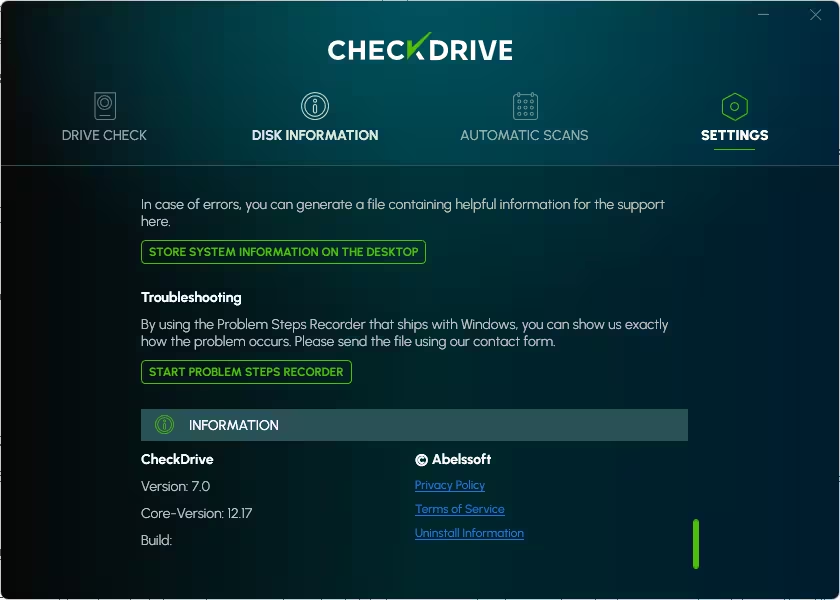
Abelssoft CheckDrive 2026 is a disk analysis tool for Windows users that scans their PC’s internal drives for errors and provides details about their S.M.A.R.T. (Self-Monitoring, Analysis, and Reporting Technology) parameters to help keep them running at their best.

CheckDrive 2026 can monitor your HDD, SSD, or USB drive, identify and fix issues, and even predict its lifespan using SMART data.

By using the hard disk tool, you can detect problems at an early stage. You can back up your data, avoid mechanical drive crashes, and swap out damaged drives. There is a background monitor that analyzes your drives in real time; the full version also lets you do drive analysis at specific intervals. You can also do manual checks.

Get Abelssoft CheckDrive 2026 Full Version for Free:


Download the giveaway version installer from any of these links: Link 1 / Link 2 / Link 3

Please proceed to launch the installer and complete the installation process. This pre-activated installer does not require a license code.


Note:

If your PC doesn’t have any Abelssoft giveaway edition software installed, you might receive an activation request. To unlock the full version, enter your email address and complete the verification process.


About Abelssoft CheckDrive 2026

If you want to automate disk monitoring operations, fix disk failure issues, and perform routine checks on your internal drives, then CheckDrive is the tool you need. With little setup and a pleasing user interface, this tool can scan and monitor your computer’s hard drives in excellent detail.


This diagnostic software can scan for problems and identify them upfront. For instance, this program can perform a system scan, identify and assess both SSDs (solid-state drives) and HDDs (hard disk drives), and pinpoint any recorded issues. Its first function is to detect and report common hard drive issues.

The app’s algorithms determine the general health status of your internal drives by factoring in S.M.A.R.T. data and frequent performance reports derived from your disks’ manufacturer information. This feature improves the program’s forecast accuracy.

This software solution from Abelssoft provides a comprehensive disk analysis. Therefore, it’s reasonable to assume that this scan would take a few hours. If additional data requires identification, repair, or recovery, the process can become significantly more complex, potentially leading to longer wait times and the need for more advanced tools or expertise.

Due to the time-consuming nature of lengthy processes, CheckDrive allows you to minimize the app and run its functions in the background.

The “Automatic Scan” feature is included in the Plus (full) version of the program, allowing users to automate and schedule inspections of their hard disk drives (HDD) and solid-state drives (SSD). There is a ‘Background Guard’ feature to monitor your hard drive in real time. To enable Windows to check for changes in your drive’s health data each time it boots, you can activate this option.

CheckDrive is a feature-rich and user-friendly program designed for individuals who want to monitor the health of their PC’s disk. This tool is ideal for broad problem analysis and repair, allowing you the freedom to run disk scans in the background as needed.

Key Features:

  • The app interface is designed to be user-friendly and simple to navigate.
  • CheckDrive includes various diagnostic tools capable of identifying and resolving drive issues.
  • CheckDrive provides in-depth insights into the status and performance of your drives.
  • CheckDrive 2026 supports a wide variety of disks, including USB drives, HDDs, SSDs, and more.
  • For hassle-free upkeep, you can set up automatic scans of your drives.
  • The software safeguards data instantly by using the background guard that continuously monitors all storage media. With this approach, you receive timely alerts before any defects arise.
  • Advanced file system analysis scans for and fixes disk errors to maintain the integrity of your file system.

ظهرت المقالة Abelssoft CheckDrive 2026 Full Version for Free [Drive Diagnostic Software] أولاً على WKConquer | Discover Software, Games & Essential PC Tools.
Ashampoo Home Design 11 Giveaway: Get a Free Lifetime License in July 2026

Par : Scorpio
16 juillet 2026 à 22:21

If you’ve ever sketched your dream living room on a napkin or argued with your spouse about where the sofa really fits, Ashampoo Home Design 11 is about to make your life a whole lot easier — and right now, you can grab the full version completely free.

Ashampoo just launched a limited-time giveaway for the brand-new Home Design 11 (normally $70, currently discounted to $28 on their store). Unlike last year’s Home Design 10 offer — which was a 1-year license — this 2026 promotion ships with a proper 1-computer lifetime license, free updates within v11, and free tech support. That’s a serious upgrade. Below is the exact step-by-step to claim your key, plus a hands-on review of what’s new in version 11.


Ashampoo Home Design 11 Free Lifetime License Box Shot
Ashampoo Home Design 11 box art


🏠 LIFETIME LICENSE
🎁 Ashampoo Home Design 11 — Free Lifetime License (Worth $70)

Design, remodel and furnish your entire home in stunning 3D. Lifetime license, free v11 updates, and free tech support — yours at zero cost while the giveaway lasts.

$70Now FREE
🖥 1 PC · Lifetime
⚙ Windows 10/11

🎯 Claim Your Free Key Now →


⚡ Quick Read — What You’re Getting
  • ✓Product: Ashampoo Home Design 11 v11.0.0 — full retail edition
  • ✓Regular price: $70 USD (currently $28 on Ashampoo’s store)
  • ✓Your cost: $0.00 — just your email address
  • ✓License type: 1-computer lifetime license (not a trial, not yearly)
  • ✓Includes: Free v11 updates + free technical support
  • ✓Download size: 1.7 GB · Platform: Windows 10/11 (64-bit)
  • ✓Best for: Home renovators, interior planners, DIYers, hobbyist architects

Contents [show]

What is Ashampoo Home Design 11?

Ashampoo Home Design 11 is a Windows-based 3D home planning and CAD application developed by Ashampoo GmbH & Co. KG — a 25+ year veteran German software house with over 22 million users worldwide. It’s built for homeowners, interior designers, real-estate enthusiasts, and DIY renovators who want to plan, remodel or virtually furnish a home before lifting a hammer.

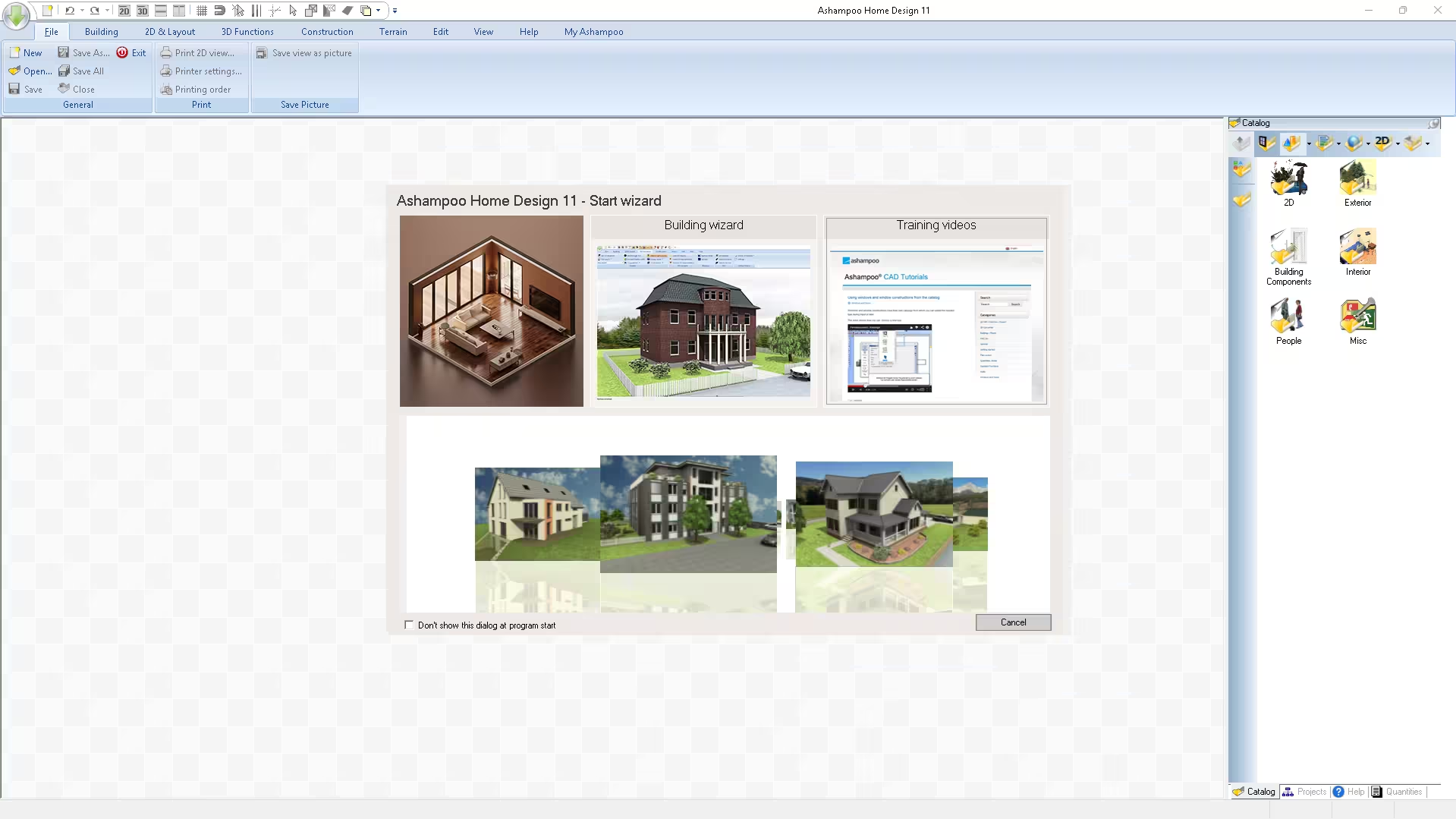
You start with a blank 2D floor plan or a guided Building Wizard, drop in walls, doors, windows, roofs and stairs, then watch your design come alive in a fully navigable 3D view — complete with realistic lighting, shadows, textures and a virtual walkthrough mode.


Ashampoo Home Design 11 Start Wizard with 2D layout, Building Wizard, and Training Videos
Ashampoo Home Design 11 Start Wizard—choose from a blank plan, the Building Wizard, or training videos

What’s New in Ashampoo Home Design 11 (vs. Home Design 10)

If you already grabbed last year’s Home Design 10 giveaway, version 11 is a genuine upgrade — not just a version bump. Here’s what’s changed:

  • Millions of new 3D objects: v11 now imports SketchUp and Collada (.dae) models natively. That instantly unlocks every free model on the 3D Warehouse — generic and brand-specific.
  • Smarter photovoltaic planner: Roof-mounted solar systems are now configured with auto-detection — point at a roof side and the software calculates module layout, tilt and orientation automatically.
  • Improved ribbon UI: The toolbar groups (File · Building · 2D & Layout · 3D Functions · Construction · Terrain · Edit · View · Help · My Ashampoo) are reorganised for fewer clicks.
  • Faster 3D rendering: Light and shadow simulation now runs noticeably smoother on mid-range GPUs (tested on a GTX 1650 Ti — fluid 1080p walkthroughs).
  • Expanded object catalog: Six categories — 2D, Exterior, Building Components, Interior, People, Misc — each with significantly more items than v10.
  • Lifetime license (vs. v10’s 1-year): The biggest win for giveaway hunters.

Key Features at a Glance


Ashampoo Home Design 11 main UI showing 3D view and 2D floor plan side by side
Ashampoo Home Design 11 UI— main UI with 3D view (left) and 2D floor plan (right)

1. Full 2D + 3D Design Workflow

Switch instantly between an accurate 2D floor plan view and a photorealistic 3D walkthrough. Draw walls with polygon and line tools, then jump into 3D to inspect angles, light and clearances.

2. Drag-and-Drop Object Catalog

The side panel houses ready-made furniture, fixtures, exterior props, plants, vehicles and even people — drag any item into your scene and it scales correctly to your floor plan. Combined with v11’s SketchUp/Collada import, you effectively have an endless library.

3. Photovoltaic & Solar Planning

Plan a roof-mounted PV system in minutes — pick modules from the catalog, point at a roof side, and the program computes layout, tilt, orientation and module count for you. Brilliant for anyone considering solar.

4. Virtual Walkthroughs with Realistic Lighting

Move freely through your future home in 3D, with day/night light simulation and surface materials that respond to it. It’s the closest thing to a real walkthrough before construction.

5. Auto Calculations (No Math Required)

Angles, lengths, areas, volumes — the software does the geometry while you focus on aesthetics. Surface areas auto-update as you reshape walls, which is invaluable when estimating paint, flooring or tiles.

6. Multi-Floor & Multi-Building Projects

Design multi-story homes, duplexes, or even small neighbourhoods. Each floor is editable independently and the 3D view stitches them seamlessly.

7. High-Quality Export & Print

Save 2D views as images, export 3D scenes, or send plans to print — perfect for sharing with contractors, architects, or family before signing off on a remodel.

How to Get Ashampoo Home Design 11 Free Lifetime License — Step by Step

The whole process takes about 5 minutes. Make sure you complete activation while the giveaway is live — Ashampoo doesn’t publish an exact end date.


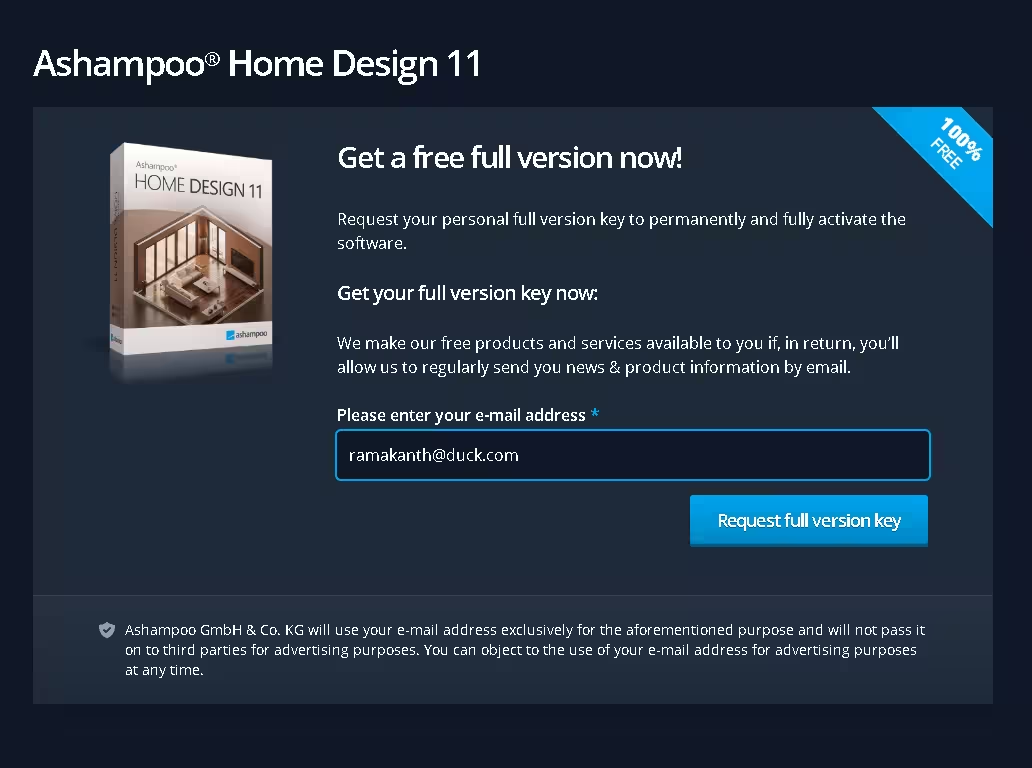
Ashampoo Home Design 11 giveaway registration page asking for email address
Enter your email on the official giveaway page


  1. 1Visit the official giveaway page — Open the Ashampoo Home Design 11 giveaway page on the official Ashampoo website.
  2. 2Enter your email address — Type a valid email and click the “Request full version key” button. (Use a real address — Ashampoo will email a confirmation link.)
  3. 3Confirm your email — Open the verification email from Ashampoo and click the confirmation link. First-time users will also be prompted to register a free myAshampoo account.
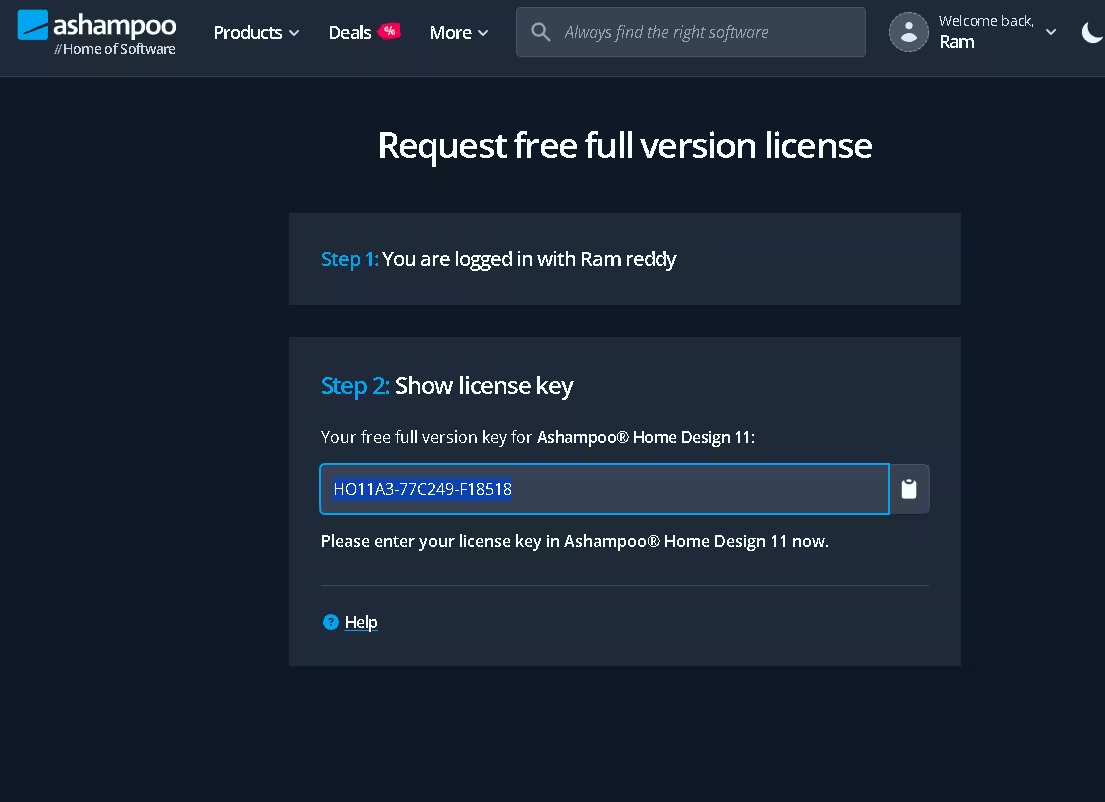
  4. 4Log in and copy your license key — Sign in to your Ashampoo account; the giveaway page will now show “Step 2: Show license key” with your unique full-version key. Copy it.
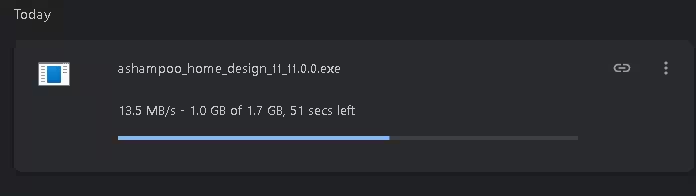
  5. 5Download the installer — Download the installer from Ashampoo.com or grab the offline installer (1.7 GB) directly from Ashampoo’s CDN: ashampoo_home_design_11_11.0.0.exe
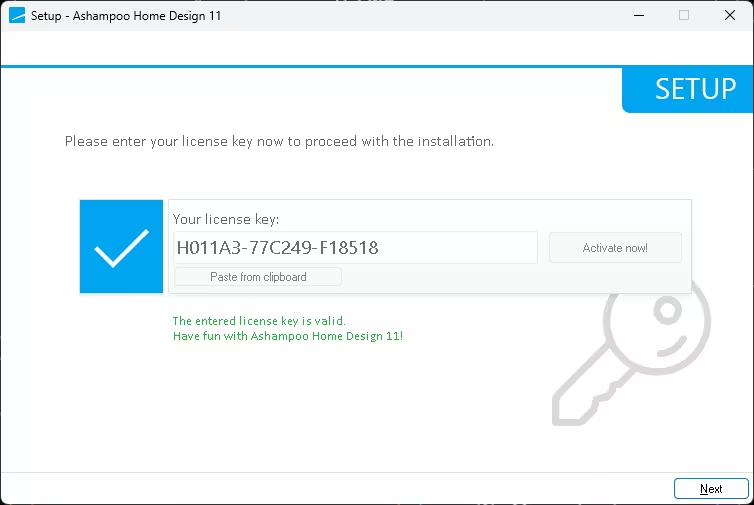
  6. 6Install and activate — Run the installer. When the setup screen asks for a key, paste your license code and click “Activate now!”. You’ll see “The entered license key is valid. Have fun with Ashampoo Home Design 11!”
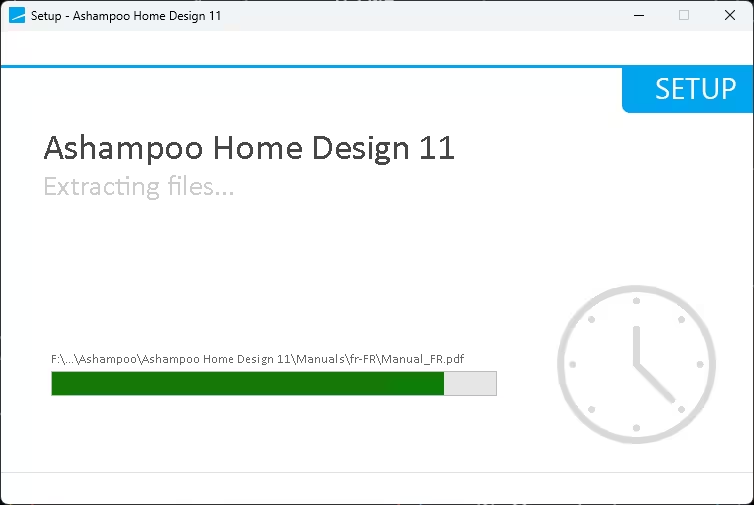
  7. 7Click Next and finish setup — The installer extracts the program (about 60 seconds on an SSD) and you’re ready to design.


Ashampoo account showing free full version license key for Home Design 11
Step 2 reveals your unique full-version license key


Browser downloading the 1.7 GB Ashampoo Home Design 11 installer
The 1.7 GB offline installer downloading


Ashampoo Home Design 11 setup extracting files during installation
Setup extracts files into Program Files\Ashampoo\


Ashampoo Home Design 11 activation screen with valid license key entered
Paste your key and hit “Activate now!”

License Terms & Conditions

License scope 1-computer lifetime license
Updates Free updates within the same major version (v11)
Technical support Included, free of charge
Activation requirement Must be activated before the giveaway offer ends
Commercial use Personal / non-commercial use recommended for the giveaway key

System Requirements & Technical Details

Developer Ashampoo GmbH & Co. KG (Germany)
Version 11.0.0
Operating System Windows 10 / Windows 11 (64-bit only)
Processor Intel or AMD, 2 GHz dual-core or faster
RAM 4 GB minimum · 8 GB recommended for smooth 3D rendering
Graphics OpenGL 3.3-compatible GPU (dedicated GPU recommended)
Storage 2 GB free disk space (1.7 GB installer)
Internet Required for activation & v11 updates
Languages English, German, French, Italian, Spanish, Dutch, and more

Ashampoo Home Design 11 vs. Popular Alternatives

  • vs. SketchUp Free: Home Design 11 is built specifically for residential planning — no learning curve, instant photorealistic 3D. SketchUp Free is more general-purpose and lives in the browser.
  • vs. Sweet Home 3D (Free, open-source): Sweet Home 3D is free but limited in 3D realism, object variety and roof tools. Home Design 11 is a complete CAD package.
  • vs. RoomSketcher: RoomSketcher is browser-based with paid tiers; Home Design 11 is a desktop app that works offline and includes solar planning out of the box.
  • vs. Live Home 3D / Planner 5D: Home Design 11 ships with more accurate calculations (areas, volumes, angles) and dedicated photovoltaic planning — strong for serious DIY renovators.
  • vs. Ashampoo Home Design Pro 11: The Pro edition adds advanced CAD precision tools, professional terrain modelling and commercial-use rights. For most homeowners, the giveaway edition is more than enough.

Who Should Use Ashampoo Home Design 11?

  • Homeowners planning a renovation — visualise before you demolish.
  • First-time home buyers — check if your furniture actually fits the new floor plan.
  • Interior design hobbyists — experiment with layouts, materials and colours risk-free.
  • Real-estate agents — produce simple 3D walkthroughs for listings.
  • DIY solar enthusiasts — plan a roof-top PV array before talking to installers.
  • Students of architecture or interior design — affordable hands-on CAD practice.


🏆 Final Verdict — Is It Worth Grabbing?
⭐ 4.7 / 5 — Excellent Freebie

Ashampoo Home Design 11 is one of the most generous Ashampoo giveaways of 2026. You’re getting a $70 professional 3D home-planning application for free, with a lifetime license, free v11 updates, and free tech support — terms that are unusually customer-friendly for a giveaway. The new SketchUp/Collada import alone makes it worth installing, and the photovoltaic planner is a feature most paid competitors charge extra for.

If you’ve ever wanted to mock up a remodel, plan a new build, or just see if that L-shaped couch will actually fit, claim this key today. It costs you nothing and could save you thousands in renovation mistakes.

👍 Pros

  • Lifetime license (not a trial)
  • Realistic 3D walkthroughs
  • Huge object catalog + SketchUp import
  • Smart photovoltaic planner
  • Beginner-friendly with wizards
  • Free updates + tech support

👎 Cons

  • Windows-only (no Mac/Linux)
  • 1.7 GB download — slow connections
  • Email confirmation required
  • UI looks slightly dated vs. SaaS rivals

Frequently Asked Questions (FAQ)

Is Ashampoo Home Design 11 really free?

Yes. Through the official Ashampoo giveaway, you can claim a free full-version lifetime license for Ashampoo Home Design 11 (regularly $70). The license is valid for one PC, includes free updates within v11, and comes with free technical support.

Does the free license expire after one year like Home Design 10?

No. Unlike last year’s v10 promotion, the Ashampoo Home Design 11 giveaway is a 1-computer lifetime license. You can use it indefinitely on the activated PC as long as you claim it before the giveaway period ends.

What’s new in Ashampoo Home Design 11 compared to v10?

Version 11 adds native SketchUp and Collada (.dae) import (millions of new 3D models), a smarter photovoltaic planner with automatic roof detection, faster 3D rendering, a refined ribbon UI and an expanded object catalog spanning 2D, exterior, building components, interior, people and miscellaneous categories.

Is Ashampoo Home Design 11 available for Mac or Linux?

No — it’s a Windows-only application requiring 64-bit Windows 10 or Windows 11. Mac and Linux users would need to run it inside a Windows VM (Parallels, VMware Fusion, etc.).

Do I need CAD or design experience to use it?

Not at all. The built-in Start Wizard offers three paths — empty floor plan, Building Wizard, or video tutorials. Drag-and-drop catalogs and auto-calculations let absolute beginners design a complete home in under an hour.

Can I use Ashampoo Home Design 11 for commercial projects?

The giveaway license is intended for personal, non-commercial use. Freelancers and professionals should purchase a regular license, or upgrade to Ashampoo Home Design Pro 11 for advanced CAD tools and commercial rights.

How long is the Ashampoo Home Design 11 giveaway valid?

The giveaway is time-limited. Ashampoo doesn’t publish an exact end date, but their lifetime-license promotions typically run for two to four weeks. Claim and activate your license today to avoid missing out.

What if I lose my license key later?

Don’t worry — your license is permanently linked to your myAshampoo account. Log in any time at ashampoo.com/login and retrieve the key from your account dashboard.

Conclusion

Ashampoo Home Design 11 is genuinely one of the best free software deals available in May 2026. A polished, full-featured 3D home design suite — normally $70 — yours forever for the price of an email confirmation. Whether you’re planning a renovation, designing a new build, or just nerding out on virtual interior design, this is a no-brainer install.

👉 Claim your free Ashampoo Home Design 11 lifetime license here before the giveaway expires.

For complete product details, screenshots and the full feature list, visit the official Ashampoo Home Design 11 product page.

ظهرت المقالة Ashampoo Home Design 11 Giveaway: Get a Free Lifetime License in July 2026 أولاً على WKConquer | Discover Software, Games & Essential PC Tools.
Psiphon Review 2026: A Free Anti-Censorship Tool for Bypassing Online Restrictions

Par : Scorpio
16 juillet 2026 à 22:10

Getting online freely has quietly become one of the trickier things to pull off. Between region locks, government filters and office firewalls that block half the useful internet, plenty of people hit a wall the moment they try to open something ordinary. Psiphon is one of the oldest and most battle-tested answers to that problem — a free tool with a single, stubborn mission: keep you connected when the network is trying to shut you out.

I spent time with the Windows client to see how it holds up in 2026, poked through every settings panel, and dug into what actually happens behind that big Connect button. Here’s the honest rundown.

Psiphon 3 connected screen with Disconnect button
Psiphon main window showing the green “PSIPHON IS CONNECTED” screen

So what exactly is Psiphon?

Psiphon started life back in 2006 as a research project at the Citizen Lab, University of Toronto, and is now maintained by the Canadian company Psiphon Inc. Calling it a “VPN” is close but not quite right. It’s better described as a censorship-circumvention tool that keeps a few different tricks up its sleeve: full VPN tunnelling, SSH, and an HTTP proxy layer, all working together.

The clever part is that it doesn’t rely on any single method. If one route gets blocked, Psiphon quietly shuffles to another until something sticks. That’s why it keeps working in places where big-name VPNs suddenly go dark — it treats a blocked connection as a puzzle to solve, not a dead end. It also runs a large, constantly rotating network of servers, so the blockable target keeps moving.

Handy detail:The Windows version isn’t a bulky installer. It’s a single digitally-signed.exefile you can double-click or run straight off a USB drive — perfect for a locked-down machine where you can’t install software.

Connecting is genuinely a one-tap job

There’s no account to create, no email to hand over, nothing to configure before you start. Launch the app, hit the green Connect button, and within a few seconds the shield flips to a green tick that reads “PSIPHON IS CONNECTED.” That’s the whole ritual.

Psiphon 3 disconnected screen with Connect button
Psiphon before connecting — one click on the green Connect button and you’re through

By default it uses the Best Performance option, which lets Psiphon auto-pick the fastest available server for you. If you’d rather land in a specific country — say to reach a service that behaves as though you’re local — open the region selector and choose from the list, which includes the likes of the United States, United Kingdom, Germany, France, Canada, the Netherlands, Singapore and more.

Psiphon server region dropdown showing country flags
The “Select server region” dropdown open, listing countries with flags

The settings menu is where power users get to play

On the surface Psiphon is dead simple, but flip to the Settings tab and it opens up into a proper toolkit. Each option is a collapsible panel, and after tweaking anything you just tap Apply Changes. Here’s what each one actually does:

Psiphon Settings tab showing list of collapsible setting panels
The Settings tab showing all eight configurable panels
Minimize to Tray
Tucks Psiphon into the Windows notification area so it runs quietly in the background.
Disallowed Traffic Alert
Warns you when certain traffic can’t be tunnelled, so you’re never guessing why something won’t load.
Split Tunnel
Lets sites inside your own country skip the tunnel entirely. Faster local browsing, and it can trim your data usage.
Disable Timeouts for Slow Networks
Stops the app from dropping the connection on painfully slow links — a lifesaver on shaky mobile data.
Psiphon Server Region
Same country picker as the home screen, only tucked into settings for convenience.
Local Proxy Ports
Set your own HTTP/SOCKS proxy ports (left on automatic by default) for pointing other apps at Psiphon.
Upstream Proxy
Tell Psiphon about a proxy your PC already sits behind — useful on corporate networks.
Transport Mode
Switches to L2TP/IPsec so the whole device routes through Psiphon, not just proxy-aware apps.
Psiphon Server Region settings panel with country list
The Psiphon Server Region settings panel with its full country list

A closer look at Split Tunnel

This one trips people up, so it’s worth spelling out. On the Windows client, Split Tunnel doesn’t work app-by-app the way some VPNs do — it works by region. Tick “Don’t proxy websites within your country” and your local sites load directly (they’re usually not blocked anyway), which speeds things up and saves data. There’s also a “Don’t proxy Chinese websites” toggle, since China’s Great Firewall specifically targets proxy traffic, so those sites often load better on your own connection.

One heads-up:Psiphon flags that this feature leans on data that isn’t always perfectly accurate, so a censored site could occasionally get excluded by mistake. If something blocked won’t open, switch Split Tunnel off and try again.
Psiphon Split Tunnel settings with proxy checkboxes
The Split Tunnel panel expanded, showing both checkbox options

Transport Mode, in plain English

Out of the box Psiphon leans on SSH with an obfuscation layer, which disguises the fact that you’re using it at all — that’s a big part of why it survives in heavily filtered networks. Flip on Transport Mode and it switches to the L2TP/IPsec protocol, routing your entire system (not just the browser) through the tunnel. The trade-off: this mode drops the obfuscation, so it’s easier for firewalls to spot and block. Use it when you want full-device coverage on a friendlier network, and leave it off where censorship is aggressive.

PsiCash and Speed Boost: pay only when you need it

Here’s the part worth being straight about. The free tier gives you unlimited data but throttles speeds to roughly 2 Mbps. That’s perfectly fine for reading news, messaging, social apps and light browsing — the exact things people in restricted regions actually need — but it’ll crawl if you try to stream HD video.

To lift the cap, Psiphon uses an in-app token called PsiCash. You start with a batch of free tokens, and you can earn more (through in-app activity) or buy them outright. Spend those tokens on a Speed Boost and the limit disappears for a set window — an hour, a day, a week, whatever you pick. It’s a nice change from being locked into a monthly bill: you top up speed only for the times you genuinely need it, then drop back to free.

Prefer a truly free, no-strings speedy VPN for everyday privacy on public Wi-Fi? We rounded up the best ones in our guide to the35 best free PC programs for 2026, where Proton VPN’s no-cap free tier gets a shout-out.

It speaks a lot of languages

Since Psiphon’s whole reason for existing is helping people worldwide, the interface ships in a huge spread of languages — English, Español, Français, Deutsch, العربية, فارسی, Русский, 简体中文, हिन्दी, Türkçe, Tiếng Việt and dozens more. You switch from the Language menu without digging through anything. A small thing, but it matters when the target audience spans continents.

Psiphon language selection screen with many languages
The Language selection screen with the full multi-column list

The honest part: what Psiphon is NOT

This is where a lot of reviews go quiet, but you deserve the full picture. Psiphon itself is refreshingly upfront that it is a circumvention tool, not a privacy or anti-surveillance product. Keep these limits in mind:

👍 What it nails

  • Genuinely free with no data caps or sign-up
  • Keeps working where other VPNs get blocked
  • Auto-switches protocols to stay online
  • One-click simple, yet deeply configurable
  • Open source and regularly audited
  • Portable single-file Windows build

👎 Where it falls short

  • No kill switch to catch dropped connections
  • Logs some data (country, ISP); testers have seen IP/DNS leaks
  • Free speeds cap around 2 Mbps
  • Streaming services and torrenting are off the table
  • Ads appear in the free version
  • Not built for true anonymity — use Tor for that


If you need to read the blocked internet, Psiphon is excellent. If you need to vanish from the internet, reach for a strict no-logs VPN or the Tor network instead. For a one-click, whole-PC Tor route, our OnionHop guide is a solid next read, and if you just want a free everyday VPN, the VPNly review covers a no-logs Swiss option.

Who’s Psiphon actually for?

Picture a journalist filing from a country that just throttled social media, a student stuck behind a school firewall, someone in a region where a messaging app got switched off overnight, or a traveller who wants to reach a service back home. That’s Psiphon’s home turf. It’s the tool you keep in your back pocket for the moment the internet suddenly shrinks — free, quick, and stubbornly good at getting through.

How to download Psiphon

Grab it only from the official source to be safe. Psiphon is available for Windows, macOS, Android and iOS from the developer’s site at psiphon.ca. On Windows it’s the single signed .exe — no install needed. Mobile users can pick it up from the Google Play Store and Apple App Store. Hunting for more free security and privacy tools? Bookmark our Free Stuff hub for fresh giveaways every week.

Get Psiphon Free →

✅ The Verdict

Psiphon has earned its reputation the hard way — by working when it counts. It’s free, open source, dead simple to fire up, and remarkably resilient against blocks that stop pricier VPNs cold. The deep settings menu means power users can fine-tune it, while everyone else can just tap Connect and forget it.
The trade-offs are real and worth knowing: modest free speeds, no kill switch, some logging, and it’s built for beating censorship rather than hiding your identity. Judge it as what it is — an anti-censorship lifeline — and it’s one of the best free tools of its kind. Pair it with a proper privacy VPN or Tor when anonymity is the goal, and you’ve got both bases covered.
Rating: 4.3 / 5 — Free & highly recommended for beating blocks

Frequently Asked Questions

Is Psiphon free to use?

Yes. The core app is completely free with no data caps and no sign-up. The free tier tops out around 2 Mbps — fine for browsing and messaging, slow for HD video — and you can lift that limit temporarily with PsiCash tokens.

Is Psiphon a real VPN?

Not in the classic sense. It’s a censorship-circumvention tool that blends VPN, SSH and HTTP proxy technology and auto-switches between them to stay connected. Its aim is getting you past blocks, not masking your identity.

Does Psiphon keep me anonymous?

No, and it says so plainly. It encrypts traffic between you and its servers, but it isn’t an anonymity tool. There’s no kill switch and testers have observed leaks. For real anonymity, use Tor or a strict no-logs VPN.

What is PsiCash and Speed Boost?

PsiCash is Psiphon’s in-app token. You start with free tokens and can earn or buy more, then redeem them for a temporary Speed Boost that removes the free-tier cap for a chosen window. It’s a pay-when-you-need-it model instead of a subscription.

Which devices support Psiphon?

Windows, macOS, Android and iOS. The Windows build is a single signed .exe with no installer, so it even runs from a USB stick.

Can Psiphon unblock Netflix or handle torrenting?

Not reliably. Streaming platforms like Netflix and BBC iPlayer block Psiphon’s servers, and torrenting isn’t supported. It shines at reaching blocked sites, news and social apps — not media libraries or P2P.

ظهرت المقالة Psiphon Review 2026: A Free Anti-Censorship Tool for Bypassing Online Restrictions أولاً على WKConquer | Discover Software, Games & Essential PC Tools.
Abelssoft SSD Fresh 2026 Plus Giveaway: Get the Full Version Free and Extend Your SSD Lifespan

Par : Scorpio
16 juillet 2026 à 22:05

Offer Status: 🟢 ACTIVE (Expires: Limited Time)
Platform: Windows 11 / 10 / 8 / 7
Official Partner: Abelssoft
Disclaimer: This is an official promotional giveaway provided by Abelssoft. We do not host cracked or pirated software. The license provided is strictly for personal, non-commercial use.

Abelssoft SSD Fresh 2026 Plus is a focused Windows utility built specifically to help your SSD last longer and run cleaner. Unlike general-purpose PC cleaners, it targets the one thing that actually shortens SSD lifespan — unnecessary read/write operations. If you have been running Windows on an SSD for more than a year, there is a good chance Windows is quietly burning through write cycles in the background without you realizing it.

Abelssoft SSD Fresh 2026 Plus welcome screen showing SSD optimization interface
Abelssoft SSD Fresh 2026 Plus — Welcome screen on first launch

Why We Are Featuring This Giveaway

SSDs are genuinely different from old spinning hard drives, and Windows was not originally designed with them in mind. Features like automatic defragmentation, short file name generation, and aggressive logging were built for HDDs — and they quietly eat into your SSD’s limited write endurance every single day.

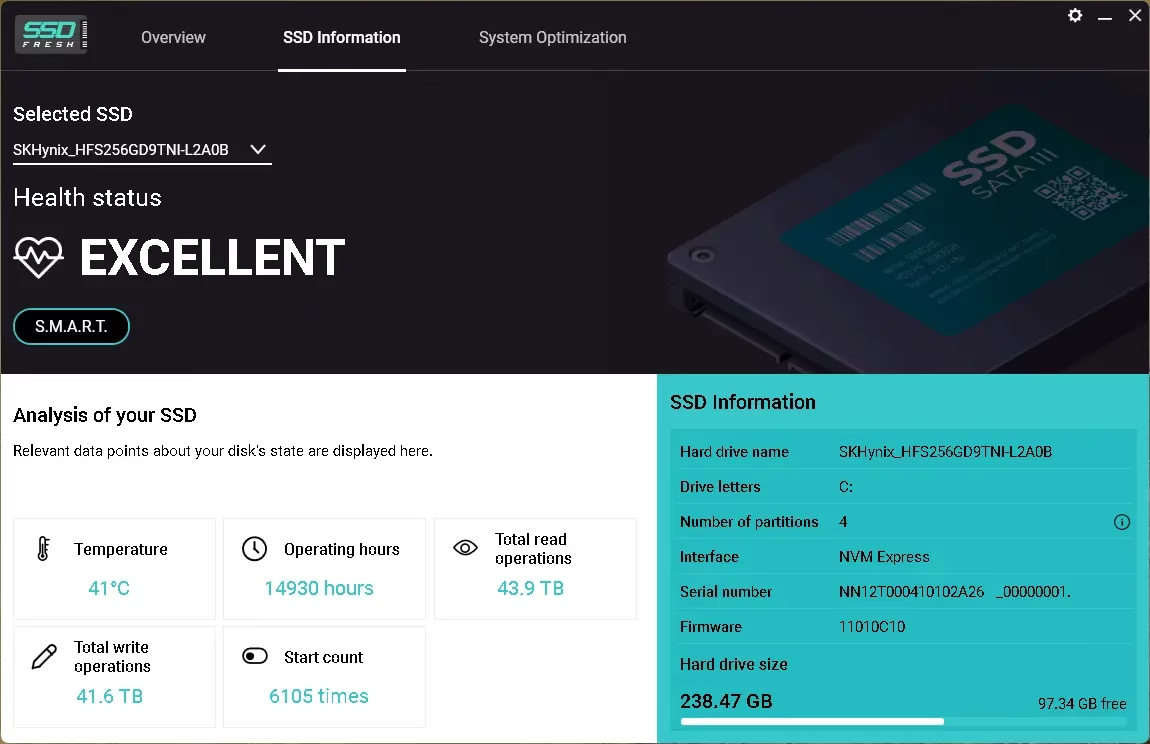
We tested SSD Fresh 2026 Plus on a mid-range laptop running Windows 11 with a 256GB SATA SSD. After running the optimization scan, it flagged four active settings that were adding unnecessary writes — including scheduled defragmentation and Windows logging. Disabling those brought our daily write load down noticeably. If you own a budget laptop with a smaller SSD, this kind of tuning genuinely matters over a 2–3 year period.

If you are already comfortable tweaking Group Policy and the Registry yourself, you may not need this. But if you want a clean, simple interface that handles all of that in one go — and does it safely — this Plus license is worth grabbing while it is free.

Abelssoft SSD Fresh 2026 main window showing SSD optimization dashboard on Windows 11
SSD Fresh 2026 Plus — Main dashboard showing your SSD health status and optimization options

Pros & Cons

What We Liked What Could Be Better
Simple one-click optimization — no technical knowledge needed No built-in SSD benchmark tool
Accurately detects and disables HDD-centric Windows settings harmful to SSDs The Plus giveaway version is time-limited; the free tier has fewer features
Displays real S.M.A.R.T. data — temperature, error counts, health status UI looks slightly dated compared to newer tools
Lightweight — barely any RAM usage in the background Does not support M.2 NVMe health monitoring on all chipsets
Covers multiple drives if you have more than one SSD installed No automatic scheduled scans — you run it manually

Key Features of Abelssoft SSD Fresh 2026 Plus

Here is what you actually get with the Plus version of this giveaway:

  • SSD Optimization Engine: Identifies and disables Windows processes that cause excessive read/write cycles on your drive — things like auto-defrag, 8.3 filename creation, and system restore logging.
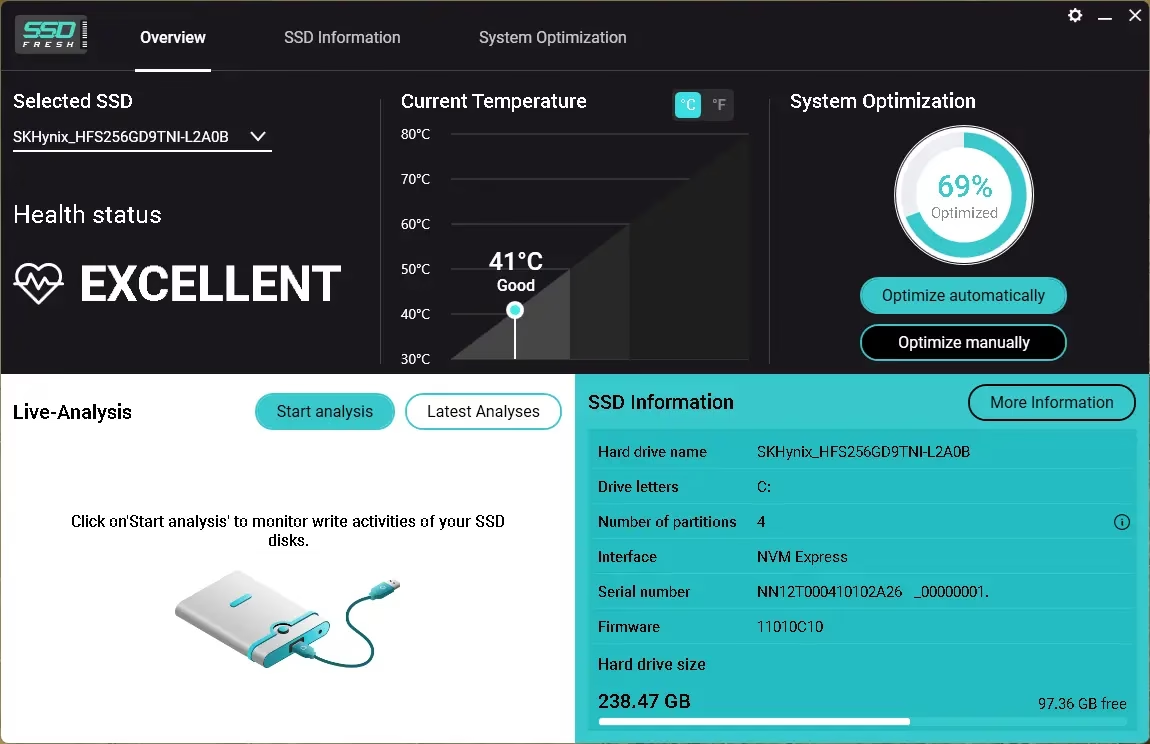
  • S.M.A.R.T. Health Monitor: Reads your drive’s built-in health data — including temperature, reallocated sector count, and power-on hours — and flags anything that looks abnormal.
  • Drive Summary Panel: Shows your SSD model, total capacity, number of partitions, and file system type at a glance.
  • Multi-Drive Support: If your PC has more than one SSD (or a mix of SSD and HDD), SSD Fresh handles each drive individually.
  • Windows Integration Tweaks: Safely manages settings like system recovery, Windows logging, and short folder name generation — all of which were designed for spinning drives.
SSD Fresh 2026 Plus showing SSD information panel with S.M.A.R.T. data including temperature and health status
SSD Fresh 2026 Plus — SSD Information panel displaying S.M.A.R.T. health data and drive details

How to Download and Activate Your Free Plus License

Follow these steps carefully. The giveaway version requires email-based activation through Abelssoft directly — there is no serial key to enter manually.

  1. Download the Installer: Grab the official giveaway build (Build 71981) from one of the links below. These are the only authorized sources — do not download from anywhere else.
    Download Link 1 (Dropbox)  |
    Download Link 2 (Box)  |
    Download Link 3 (GoFile)
  2. Run the Installer: Double-click the downloaded .exe file and follow the installation wizard. The setup is straightforward — just click through and let it install.
  3. Launch SSD Fresh 2026 Plus: Open the application once installation is complete.
  4. Go to the Activation Window: Inside the app, look for the “Activation” section in the menu.
  5. Enter Your Details: Type in your first name, last name, and a valid email address.
  6. Click “Get a free unlock email now”: Abelssoft will send a confirmation email to the address you entered. The sender will be software@abelssoft.net — check your spam folder if you do not see it within a few minutes.
  7. Confirm Your Email: Click the link in the email. Your copy of SSD Fresh 2026 Plus is now fully unlocked.
Abelssoft SSD Fresh 2026 Plus new giveaway build July 2026 activated and running
Abelssoft SSD Fresh 2026 Plus — Updated July 2026 giveaway build (Build 71981) after successful activation

SSD Fresh 2026 Plus vs. Free Alternatives

You might be wondering — why use this when Windows already has built-in SSD features? Here is a straight comparison:

Feature SSD Fresh 2026 Plus Windows Built-in Tools CrystalDiskInfo (Free)
SSD-Specific Optimization Yes — Automated Partial (TRIM only) No
S.M.A.R.T. Monitoring Yes — With alerts No Yes — Detailed
Disable Auto-Defrag for SSDs Yes — One click Manual (buried in settings) No
Drive Health Summary Yes No Yes
Multi-Drive Support Yes Partial Yes
Ease of Use Beginner-friendly Requires technical knowledge Intermediate

Bottom Line: If you want detailed technical data and are happy to interpret raw S.M.A.R.T. numbers yourself, CrystalDiskInfo is a solid free option. But if you want something that actually makes changes to protect your SSD — not just reads the data — SSD Fresh 2026 Plus is in a different category, and getting the Plus version free is a good deal.

Frequently Asked Questions

Does SSD Fresh 2026 work on NVMe drives?
Yes. SSD Fresh 2026 Plus supports both SATA and NVMe SSDs. S.M.A.R.T. data availability may vary depending on your motherboard and NVMe controller.

Is this a cracked or unofficial version?
No. This is an official promotional giveaway hosted by Abelssoft. The activation goes through their own servers via email confirmation.

How long does the Plus license last?
The giveaway grants you the Plus version for free. Abelssoft has not published a specific expiry for the activated license — but the download link for this particular build is time-limited, so grab it while it is active.

Will it slow down my PC?
No. SSD Fresh runs its optimization checks on demand, not continuously in the background. It uses minimal resources and does not run as a startup service unless you specifically enable that option.

Is it safe to disable auto-defragmentation on my SSD?
Yes — and it is actually recommended. Windows defragmentation was designed for spinning hard drives. On SSDs, it adds unnecessary write cycles without improving speed. Windows 10 and 11 are supposed to skip defrag on SSDs automatically, but this does not always work correctly, especially on older installations or after upgrades.

Also check out our other free software giveaways — we regularly post verified, legitimate promotions from software developers.

ظهرت المقالة Abelssoft SSD Fresh 2026 Plus Giveaway: Get the Full Version Free and Extend Your SSD Lifespan أولاً على WKConquer | Discover Software, Games & Essential PC Tools.
CBackup Professional Review 2026: The Ultimate All-in-One Backup Solution for Windows Users

Par : Scorpio
16 juillet 2026 à 22:03

In an era where data is among our most valuable assets, the threat of losing files to a hardware crash, accidental deletion, or a ransomware attack is very real. According to industry data, hard drives fail at an alarming rate globally every week, and a huge proportion of data loss events stem from hardware issues.

The good news is that modern backup software has evolved far beyond simple file copying—and CBackup Professional is a compelling example of just how powerful and versatile a Windows backup solution can be in 2026.

Whether you are a home user with years of irreplaceable photos, a freelancer with critical project files, or a small office managing multiple workstations, CBackup Professional offers a unified platform to protect, sync, clone, and manage your data across both local storage and the cloud.

In this review, we will walk you through everything you need to know about CBackup Professional—from its core features and standout capabilities to who it is best suited for and why it deserves a place in your digital toolkit.

What Is CBackup Professional?

CBackup Professional is a feature-rich data protection software developed by AOMEI Software, a well-known name in the Windows backup and recovery space.

The Professional edition builds on the free version by offering advanced capabilities designed for power users who need more control, flexibility, and automation in their backup workflows. It supports Windows 11, 10, 8.1, 8, 7, and even Windows Server environments—making it a versatile choice for both personal and light business use.

At its core, CBackup Professional brings together four major pillars of data protection: system and file backup, folder synchronization, disk cloning, and cloud-to-cloud backup management. Having all of these functions under one roof means you can craft a comprehensive data protection strategy without juggling multiple tools or subscriptions.

Key Features of CBackup Professional

1. Comprehensive System and File Backup

One of the most fundamental features of CBackup Professional is its ability to back up virtually anything on your Windows PC. You can create complete system image backups that capture your entire operating system, settings, installed applications, and all user data in a single snapshot. This means that if your Windows installation ever becomes corrupted or your hard drive fails, you can restore everything to exactly how it was—without spending hours reinstalling software and reconfiguring your setup.

Beyond full system backups, the software lets you selectively back up specific partitions, entire disks, or individual files and folders. This granular control is particularly useful for users who only need to protect certain directories, such as a work project folder or a documents library, without the overhead of a full system backup every time.

2. Advanced Folder Synchronization

CBackup Professional goes well beyond basic backup by offering robust folder synchronization capabilities.

You can set up automatic sync tasks that mirror your files across different drives, external storage devices, or Network Attached Storage (NAS) systems. This ensures that your important files are always up to date across multiple locations, reducing the risk of working from an outdated copy.

The software supports multiple sync modes to fit different use cases. One-way mirroring keeps a destination folder as an exact replica of the source, which is ideal for maintaining strict data consistency.

Two-way sync, on the other hand, is perfect for collaborative environments where changes made from either side need to propagate to the other. Real-time sync ensures that changes are reflected almost instantly, which is invaluable for users who work with frequently updated files.

3. Disk Cloning and OS Migration

Upgrading from a traditional spinning hard drive to a faster Solid State Drive (SSD) is one of the most impactful performance upgrades you can make to an aging Windows PC.

CBackup Professional makes this process straightforward with its disk cloning and OS migration feature. You can transfer your live operating system—complete with all your installed programs, settings, and personal data—from an HDD to an SSD without having to reinstall Windows from scratch.

The cloned operating system remains fully bootable, and all your data is preserved exactly as it was on the original drive. This feature is equally useful when migrating data to a larger hard drive, replacing a failing disk, or simply creating a bootable backup copy of your current system on a separate drive.

4. Scheduled and Automated Backup Tasks

One of the biggest reasons people fail to maintain good backup habits is that manual backups are easy to forget.

CBackup Professional solves this problem with powerful scheduling options that let you automate backup and sync tasks on a daily, weekly, monthly, or even event-based schedule. Once you configure a task, the software operates silently in the background, safeguarding your data without requiring any effort from you.

You can also set the software to run a backup automatically when a specific event occurs—for example, when you connect an external USB drive or when the system starts up. This kind of event-triggered automation adds a layer of flexibility that goes beyond simple time-based scheduling.

5. Cloud-to-Cloud Backup and Synchronization

Modern users typically spread their files across multiple cloud storage services—Google Drive for documents, OneDrive for work files, Dropbox for sharing, and so on.

CBackup Professional’s cloud management capabilities allow you to back up files from one cloud service to another automatically, without having to download files to your PC and re-upload them manually. This direct cloud-to-cloud transfer saves time and bandwidth while ensuring your cloud data has an extra layer of redundancy.

The sync feature extends to the cloud as well, letting you keep files aligned across different cloud accounts automatically. If you update a file on Google Drive, for example, CBackup can sync those changes across to another cloud of your choice—all without any manual intervention.

6. Combine Multiple Cloud Accounts into One Unified Space

Perhaps one of the most creative features in CBackup Professional is its ability to merge multiple cloud storage accounts into a single, unified backup destination.

Instead of being limited to the storage cap of any one cloud service, you can combine the free storage tiers from Google Drive, OneDrive, Dropbox, and other supported services into a much larger aggregate space—effectively creating an expansive, cost-free cloud backup solution.

This feature is especially useful for users who have accumulated multiple cloud accounts over the years and want to put all that unused storage to work without paying for a premium plan.

7. Quick and Flexible Restore Options

Creating backups is only half the equation—being able to restore your data quickly when disaster strikes is equally important. CBackup Professional offers a streamlined restore process that lets you recover your full system, individual partitions, or specific files from any previously created image backup.

The restore interface is intuitive enough for non-technical users to navigate, while offering enough control options for advanced users who need to customize the recovery process.

Whether you need to roll back your system after a bad Windows update, recover a file you accidentally deleted three weeks ago, or rebuild an entire workstation from a system image, CBackup Professional handles the job efficiently.

Security and Data Privacy

Data security is a non-negotiable requirement for any serious backup solution. CBackup Professional ensures the safety of your backups by implementing 256-bit AES encryption during all data transfers.

Cloud integration is handled via OAuth authentication, which means the software never stores your cloud login credentials—only a secure authorization token is used to access your storage accounts.

For users who need to comply with data privacy regulations, CBackup also adheres to GDPR principles, processing only the personal data strictly necessary for its functions. This commitment to privacy and security makes it a trustworthy choice for both individual users and small businesses handling sensitive information.

Who Should Use CBackup Professional?

CBackup Professional is well-suited to a broad range of users. Home users who want a worry-free, automated backup system for their photos, videos, and documents will find it approachable and easy to configure.

Professionals and freelancers who cannot afford to lose their project files will appreciate the scheduling flexibility and the cloud sync features that keep multiple storage locations in sync. IT enthusiasts and power users planning storage upgrades will benefit from the disk cloning and OS migration tools.

Small businesses or home offices with multiple Windows computers and data spread across cloud services will find the centralized backup and cloud management capabilities particularly valuable.

Even users who are not deeply technical will find CBackup Professional manageable, thanks to its clean interface and guided task setup. The software strikes a good balance between simplicity for everyday users and depth of features for those who want fine-grained control.

CBackup Professional vs. Competing Backup Tools

The Windows backup software market is populated by well-known names like Acronis True Image, EaseUS Todo Backup, and Macrium Reflect. What sets CBackup Professional apart is its combination of local backup, disk cloning, and cloud-to-cloud management in a single, relatively affordable package. Many competing tools charge separately for cloud integration or limit advanced features to expensive enterprise tiers. CBackup Professional’s ability to combine multiple free cloud accounts into a unified backup space is a particularly unique value proposition that few competitors offer.

For users already in the AOMEI ecosystem—perhaps using AOMEI Backupper for local backups—CBackup Professional’s additional cloud features make it a natural complement or upgrade path.

Pricing and Availability

CBackup Professional is regularly priced at around $47.88, which represents solid value given the breadth of features on offer.

The software supports Windows 7 through Windows 11 as well as Windows Server environments, covering a wide range of hardware configurations. A free base version is also available for users who want to test the core backup and sync capabilities before committing to the Professional tier.

Giveaway:

The professional license to CBackup is sometimes given away for free for a short time. This is a great chance for users who want to try out all of the features without having to pay for them all at once.

Download the installer from https://dl.cbackup.com/CBackup_Free.exe

Run the installer and complete the installation process.

Note: This software conflicts with AOMEI Backupper (you should uninstall it)

Get your free giveaway license by visiting this giveaway page. Then start the CBackup app, click “Upgrade” or “24 Hrs Sale,” enter the license, and click “Register.”
Note: The giveaway license provides a 6-month pro subscription for free.

Final Verdict: Is CBackup Professional Worth It?

In a world where data loss can happen without warning, having a reliable, automated backup solution is not a luxury—it is a necessity. CBackup Professional delivers an impressive range of features that cover virtually every data protection scenario a Windows user might face, from creating bootable system images and migrating an OS to a new SSD to syncing files across local drives and managing backups across multiple cloud services simultaneously.

Its clean interface, strong security standards, and thoughtful automation features make it accessible to casual users while still offering the depth that power users and IT-minded individuals will appreciate. If you are looking for a single tool to handle all your Windows backup, sync, clone, and cloud management needs, CBackup Professional is well worth your attention.

Have you tried CBackup Professional or another Windows backup solution? Share your experience in the comments below—we would love to hear what works best for you!

ظهرت المقالة CBackup Professional Review 2026: The Ultimate All-in-One Backup Solution for Windows Users أولاً على WKConquer | Discover Software, Games & Essential PC Tools.

Ashampoo Snap 16 – Free License for the Best Windows Screen Capture Tool

Par : Scorpio
10 juillet 2026 à 14:36

Would you like to capture screenshots and record videos on Windows with ease? Your search ends here! Ashampoo Snap 16 is ready to transform your screen capture experience. The best part? You can claim a free license key!

What is Ashampoo Snap 16? 📸

Utilize Snap 16, a versatile screen capture and video recording app, to simplify your digital life.

This Ashampoo software makes it easy to make tutorials, keep track of workflows, and share memes. It also has powerful editing tools.

Snap 16 has many capabilities that can help you make better content, from taking screenshots of scrolling web pages to recording videos of outstanding quality.

If you’re a Windows user who wants precise and flexible screen captures, this is the solution for you. Plus, you can give it a go without spending a dime thanks to the free license!

✨ What Makes Ashampoo Snap 16 Stand Out?

    • Quick Screenshots With Just a Click.

With the instant-shot tool, you can quickly create screenshots with only two clicks!

    • Annotations in Real Time for Video Recordings

You may instantly enhance your recordings with rectangles and arrows. Minimize post-editing work with these forms because they auto-fade.

    • Tools and Interface Upgrades

It features a streamlined zoom toolbar, an improved magic eye, and a user-friendly context menu for quick access.

    • Improved Methods of Capture

You can capture the cursor’s location, add watermarks, snap horizontal and vertical scroll shots, and extract text using optical character recognition.

    • Supercharge Your Home Office

This tool is ideal for visual communication, whether you’re leading a remote conference, creating a tutorial, or simply explaining a task. An easier way to show than to tell!

    • Versatility and ease of use in sharing

It offers effortless sharing via email or Ashampoo Webspace, support for multi-monitor setups up to 4K, and the ability to create GIFs.

How to Get Your Free Ashampoo Snap 16 License Key

[New Giveaway]:

Obtaining a free license for Ashampoo Snap 16 is easy and straightforward. Follow these steps to unlock the full version at no cost:

  1. Visit the official promotion page
    Head to the Ashampoopromo page. This is where you’ll request your personal full-version license key to activate the software permanently.
  2. Enter Your Details
    Enter your email address, then click the “Request full version key” button. Log in to your Ashampoo account (or create a new one), and the giveaway page will reveal the license code.
  3. Download and install Snap 16
    Please download the installer from https://www.ashampoo.com/ashampoo_snap_16_sm.exe  Once downloaded, run the setup file and enter your license key when prompted.
  4. Activate and Enjoy
    After entering the key, your software will be fully activated, providing you with access to all premium features at no cost!

Note: Promotional offers like this are time-sensitive. Be sure to claim your free license before the offer expires.


ظهرت المقالة Ashampoo Snap 16 – Free License for the Best Windows Screen Capture Tool أولاً على WKConquer | Discover Software, Games & Essential PC Tools.

SurFlex Screen Recorder Free License Key 2026 [Windows & Mac]

Par : Scorpio
10 juillet 2026 à 13:04

Offer Status: 🟢 ACTIVE (Valid for the next 2 days — grab it before it expires!)
Platform: Windows & Mac
Official Partner: Nablamind (SurFlex)
Disclaimer: This is an official promotional giveaway by Nablamind. We do not host cracked or pirated software. The license key provided is for personal, non-commercial use only.

If you create tutorials, record gameplay, or need to capture your screen for any reason — a good screen recorder makes all the difference. We have been testing SurFlex Screen Recorder by Nablamind for a while now, and honestly, it surprised us.

Most free screen recorders either slap a watermark on your video, cap the resolution, or are so cluttered with ads that using them feels like a chore. SurFlex skips all of that. It records in 4K resolution, handles system audio and mic at the same time, and the interface is clean enough that you can figure it out without watching a tutorial.

Right now, Nablamind is giving away a free full license for SurFlex Screen Recorder — available for both Windows and Mac. Here is everything you need to know before you claim it.

About SurFlex Screen Recorder

SurFlex Screen Recorder is developed by Nablamind, a software company focused on productivity and multimedia tools. The recorder is designed to handle a wide variety of use cases — whether you are a teacher putting together online lessons, a gamer recording clips, or someone who just needs to walk a colleague through a process on screen.

What sets it apart from built-in tools like Windows Game Bar or macOS Screen Capture is the flexibility it gives you. You can record the full screen, a specific window, a selected region, or even just your webcam. And unlike basic screen capture tools, SurFlex lets you record system audio and microphone simultaneously, which is a huge deal if you are doing commentary or voiceovers.

SurFlex Screen Recorder main window showing recording options including Full Screen, Select Region, Webcam, and Sound
SurFlex Screen Recorder — Clean main interface with multiple recording modes

The software works on both Windows and Mac, and the Pro license you are getting today unlocks all recording modes without any watermark or time limit on recordings.

Why We Are Featuring This Giveaway

Screen recorders are everywhere — some of them free, some paid. So why bother with SurFlex?

We ran it through a few real-world tests: recording a 45-minute tutorial session at 1080p, capturing a gameplay session with mic commentary, and doing a split webcam + screen recording for a product demo. In all three cases, the output files were clean, the audio sync was spot on, and the software did not noticeably slow down the system during recording.

The separate audio file recording feature is particularly useful — it saves your audio as an independent track, which makes editing in post much easier if you use any video editor.

If you are comfortable with OBS and want deep customisation, this might not replace it for you. But if you want something that just works, looks good, and does not require a manual to operate, SurFlex is a solid pick — especially when it is free.

Key Features of SurFlex Screen Recorder

SurFlex Screen Recorder settings panel showing output format, quality, and audio configuration options
SurFlex Settings — Configure output format, resolution, and audio sources easily
  • Record Anything: Full screen, a selected area, a specific app, a game, or a live stream — all covered.
  • Webcam Overlay: Record yourself and the screen at the same time — great for tutorials, vlogs, presentations, and remote meetings.
  • Separate Audio File Recording: Records system sound and mic audio with perfect sync, and saves the audio as a separate file for easier editing.
  • 4K Resolution Support: Capture sharp, high-quality recordings without degradation.
  • Multiple Output Formats: Export in MP4, MOV, AVI, MKV, and more — pick what works for your workflow.
  • No Watermark (Pro): With the free license from this giveaway, recordings have zero branding overlays.
  • Lightweight Performance: Runs in the background without eating up your CPU or RAM during recording.

Pros & Cons

What We Liked What Could Be Better
Clean, easy-to-use interface No built-in video editor
Records screen + webcam simultaneously Advanced users may find it basic compared to OBS
Separate audio file output for easier editing No cloud backup or direct upload feature
4K recording support Free version has watermark (use the key below!)
Available on both Windows and Mac Limited annotation tools during recording

How to Claim and Activate Your Free SurFlex License

Follow these steps to activate the license before the giveaway expires. The process takes under two minutes.

  1. Download the Installer: Use the official download links below based on your operating system.
  2. Run the Installer: Install SurFlex on your system. The setup is quick and straightforward — no bundled extras to watch out for.
  3. Launch the App: Once installed, open SurFlex Screen Recorder.
  4. Open the Menu: Click the hamburger (Menu) icon at the top of the main window.
  5. Select “Activate”: A drop-down will appear — click Activate.
  6. Enter the License Key: Copy the key below and paste it into the activation window, then click Activate.

Official Download Links:

🔑 Official Giveaway License Key:

3020B6C7-0426-5C9A-17D4-1196028E6DE3

SurFlex Screen Recorder license activation window showing where to enter the free license key
Activation is simple — paste the key and click Activate. Done.

(Note: This key must be activated within the next 2 days. Once activated, you get full Pro access for a year from the moment you register.)

SurFlex Screen Recorder vs. Free Alternatives

Wondering how SurFlex compares to other free options out there? Here is a quick look:

Feature SurFlex Pro (This Giveaway) OBS Studio (Free) Windows Game Bar
4K Recording Yes Yes Limited
Webcam Overlay Yes Yes (complex setup) No
Separate Audio Track Yes Yes (requires config) No
Watermark-Free Yes (with license) Yes Yes
Ease of Use Beginner-friendly Steep learning curve Very basic
Mac Support Yes Yes No
Output Formats Multiple (MP4, MOV, etc.) Multiple MP4 only

Bottom Line: If you are already comfortable with OBS and like tweaking every setting manually, stick with it. But if you want something that is ready to go out of the box — especially with a free Pro license — SurFlex is genuinely worth installing.

Conclusion

SurFlex Screen Recorder is a well-built tool that does what it promises without overcomplicating things. The 4K recording, simultaneous webcam + audio capture, and clean interface make it a practical choice for anyone who records their screen regularly — whether for work, content creation, or personal use.

With this giveaway, you are getting a full Pro license at no cost. That is a deal worth taking, especially while it is still active. Just make sure to grab it in the next two days before it expires.

If you are looking for more free software deals and giveaways, check out our Free Stuff section — we post new ones regularly. You might also want to read our roundup of the best screen recording software if you want to compare more options before deciding.

ظهرت المقالة SurFlex Screen Recorder Free License Key 2026 [Windows & Mac] أولاً على WKConquer | Discover Software, Games & Essential PC Tools.

Coolmuster Data Recovery – Free 1-Year License for Windows

Par : Scorpio
10 juillet 2026 à 13:01

Coolmuster Data Recovery is an intuitive program that can search your hard drive for deleted documents and restore access to corrupted files.

Loss of data is extremely frustrating, but we can prevent it at any time by using widely available recovery tools.

About Coolmuster Data Recovery:

Efficiently recover lost or corrupted data with this Data Recovery software. The user-friendly interface requires no extensive training, making it accessible for everyone.

Coolmuster Data Recovery UI-Main Window

Select the type of damage–”deleted,” “formatted,” “raw,” or “partition recovery”–and retrieve your data easily, regardless of file type.

The software supports 550 file formats, including images, audio, video, text, emails, archives, and more.

It’s versatile and capable of checking both internal and external hard drives. After specifying the scan component, preview the list of recoverable files and folders.

For the recovery process, just choose an output location–it’s that straightforward.

Key Features:

  • Deleted File Recovery retrieves videos, images, music, and documents from partitions or portable media.
  • Format Recovery recovers lost files from formatted partitions or devices like USB drives, Zip drives, and camera memory cards.
  • Raw Recovery conducts a thorough scan to locate and recover data not found by Deleted Recovery or Partition Recovery.
  • Partition Recovery helps locate and restore lost, erased, shrunk, or damaged partitions.

Coolmuster Data Recovery Giveaway:

Visit this giveaway page.

Enter your name, email address, and captcha, then click “Submit.”

The giveaway page will display the license code, copy the code.

Download the software from https://www.coolmuster.com/downloads/

Coolmuster Data Recovery License code

Install the software, launch it, and click “Register” on the primary interface.

Enter the email address and license code you received and hit the “Register” button.

ظهرت المقالة Coolmuster Data Recovery – Free 1-Year License for Windows أولاً على WKConquer | Discover Software, Games & Essential PC Tools.

Blumentals HTMLPad | Rapid CSS | Rapid PHP | WeBuilder 2025 v18.7.0.277

Par : Scorpio
7 juillet 2026 à 16:03

Blumentals HTMLPad | Rapid CSS | Rapid PHP | WeBuilder 2025 v18.7.0.277

Blumentals HTMLPad, Rapid CSS, Rapid PHP, and WeBuilder 2025 v18.7.0.277 Review

Blumentals HTMLPad, Rapid CSS, Rapid PHP, and WeBuilder 2025 v18.7.0.277 is a professional collection of lightweight code editors designed for web developers, programmers, designers, and users who work with HTML, CSS, JavaScript, PHP, and other web technologies. These applications are known for combining the speed of a simple text editor with many useful features normally found in larger development environments.

This 2025 generation focuses on modern web development, faster coding, updated language support, improved preview tools, and AI-assisted productivity features. Blumentals presents these programs as dedicated web development tools, with WeBuilder as a general web code editor, Rapid PHP as a PHP-focused IDE, HTMLPad as an HTML/CSS/JavaScript editor, and Rapid CSS as a CSS-focused editor.

What Is This Blumentals 2025 Package?

This package includes four related but different applications:

HTMLPad is mainly designed for HTML, CSS, and JavaScript coding. It is a lightweight editor for users who build static websites, templates, landing pages, and front-end projects.

Rapid CSS is focused on CSS editing and front-end styling. It is useful for designers and developers who spend most of their time writing, organizing, validating, and improving stylesheets.

Rapid PHP is a PHP editor and IDE for developers who work with PHP, HTML, CSS, JavaScript, Smarty, XML, SQL, and related web technologies. Blumentals describes Rapid PHP as a fast and powerful PHP code editor that combines IDE features with the speed of a lightweight editor.

WeBuilder is the most complete editor in the group. It supports a wider range of web languages, including HTML, CSS, JavaScript, PHP, ASP, SSI, Ruby, Perl, and more. It is suitable for users who want one flexible editor for multiple web development tasks.

Main Features

Blumentals HTMLPad, Rapid CSS, Rapid PHP, and WeBuilder 2025 v18.7.0.277 include many features that help developers write, edit, validate, format, and manage code more efficiently.

The editors offer syntax highlighting, code completion, code folding, bracket matching, Unicode support, advanced search and replace, project management tools, code navigation, FTP/SFTP/FTPS support, built-in preview tools, validators, beautifiers, minifiers, snippets, templates, and customizable workspaces.

The 2025 generation also adds modern AI-assisted features. According to the HTMLPad 2025 upgrade page, the new version includes single-click AI access, code generation, code optimization, code rewriting, updated Chrome preview, Edge preview, updated HTML/CSS/JavaScript standards, new minifiers and beautifiers, updated SFTP support, and many fixes.

HTMLPad 2025

HTMLPad 2025 is a smart editor for HTML, CSS, and JavaScript. It is a good choice for front-end developers, template designers, bloggers, and users who create websites without needing a heavy IDE.

The program helps users write clean HTML, style pages with CSS, and add interactive behavior with JavaScript. It includes code highlighting, auto-completion, validation tools, preview features, and code formatting options.

HTMLPad is especially useful for users who want a focused editor for front-end development without extra tools they may never use.

Rapid CSS 2025

Rapid CSS 2025 is designed for users who work heavily with CSS. It is useful for editing stylesheets, building responsive layouts, fixing design issues, and organizing website appearance.

The program supports modern CSS coding features, syntax highlighting, code completion, validation, beautification, minification, and preview tools. It is suitable for web designers who want a fast and clean CSS editor rather than a large development environment.

Rapid CSS can help users write styles faster, avoid errors, and keep large CSS files easier to manage.

Rapid PHP 2025

Rapid PHP 2025 is aimed at PHP developers who need more than a simple text editor but do not want a slow, oversized IDE. It supports PHP along with HTML, CSS, JavaScript, Smarty, XML, SQL, Apache configuration files, and other web-related languages.

Rapid PHP includes PHP code intelligence, debugging support, validators, code navigation, snippets, templates, FTP/SFTP/FTPS tools, beautifiers, and integrated references. The official Rapid PHP page also highlights support for AI assistance, PHP 8 readiness, xDebug debugging, W3 HTML and CSS validation, JSLint checking, and direct server editing.

This makes it a strong choice for developers who build dynamic websites, CMS templates, PHP scripts, plugins, and web applications.

WeBuilder 2025

WeBuilder 2025 is the most advanced and flexible editor in this Blumentals group. It is built for developers who work with multiple web languages and need one editor for different coding tasks.

WeBuilder supports HTML, CSS, JavaScript, PHP, ASP, SSI, Ruby, Perl, and many other technologies. It is suitable for full-stack web developers, freelancers, agencies, and advanced users who work on different types of projects.

Compared with the other editors, WeBuilder is usually the best option for users who want the widest feature set in one application.

AI-Assisted Coding

One of the most important improvements in the 2025 generation is AI assistance. The new tools can help generate code, extend existing code, optimize code, rewrite code in another language or framework style, and reduce repetitive manual work.

This feature can be useful for both beginners and experienced developers. Beginners can use it to understand code faster, while professionals can use it to speed up repetitive tasks and improve productivity.

However, AI-generated code should always be reviewed carefully. Developers should test the output, check security, and make sure the generated code fits the project requirements.

Built-in Preview and Web Standards Support

Blumentals 2025 editors include updated preview features, including updated Chrome preview and built-in Edge preview in HTMLPad 2025. This helps developers test pages quickly without switching constantly between different applications.

The updated language specifications for HTML, CSS, and JavaScript are also important because web standards change over time. A modern editor must understand current syntax, attributes, properties, and browser behavior to help developers code accurately.

FTP, SFTP, and FTPS Support

The included editors support direct work with remote servers through FTP, SFTP, and FTPS. This is very useful for developers who manage live websites, update client projects, or edit files directly on hosting servers.

Instead of using a separate FTP client, users can connect to a server, edit files, and upload changes from inside the editor. This can save time and make the workflow smoother.

Code Formatting, Validation, and Productivity Tools

Blumentals editors include many tools that help keep code clean and organized. These include beautifiers, minifiers, validators, syntax checkers, snippets, templates, search tools, bookmarks, code navigation, and code folding.

These features are useful for large projects because they make code easier to read, debug, and maintain. They also help reduce small mistakes that can break layouts, scripts, or server-side functionality.

Supported Systems

The 2025 generation is mainly designed for modern Windows systems. The HTMLPad 2025 upgrade page states that the new version supports only Windows 10 and Windows 11.

This means users with older versions of Windows should check compatibility before installing or upgrading. For the best experience, Windows 10 or Windows 11 is recommended.

Advantages

Blumentals HTMLPad, Rapid CSS, Rapid PHP, and WeBuilder 2025 v18.7.0.277 offer several strong advantages. They are lightweight, fast, and easier to use than many large IDEs. They include strong support for modern web languages, direct server editing, code validation, formatting tools, preview features, and AI-assisted coding.

The package is also flexible because users can choose the editor that best matches their workflow. HTMLPad is ideal for front-end coding, Rapid CSS is focused on styling, Rapid PHP is designed for PHP development, and WeBuilder is the most complete all-in-one web editor.

Disadvantages

The main disadvantage is that these tools are Windows-focused, so they are not ideal for macOS or Linux users. Also, developers who need advanced enterprise IDE features, built-in Git workflows, container tools, or very large framework integrations may still prefer heavier editors such as Visual Studio Code, PhpStorm, or other modern IDEs.

Another point is that the four applications are similar in many areas, so beginners may not immediately know which one to choose. In most cases, WeBuilder is the best all-in-one option, while the other editors are better for more focused tasks.

Who Should Use This Package?

This package is suitable for web developers, PHP programmers, front-end designers, freelancers, agencies, students, website owners, and anyone who works with HTML, CSS, JavaScript, PHP, or related web technologies.

It is especially useful for users who want a fast editor with practical coding tools but do not want the heavy resource usage of large IDEs. It is also a good choice for users who manage websites through FTP/SFTP and need a clean workflow for editing and publishing code.

Final Verdict

Blumentals HTMLPad, Rapid CSS, Rapid PHP, and WeBuilder 2025 v18.7.0.277 is a strong set of professional web development editors for Windows users. The package offers fast performance, modern language support, AI-assisted coding, updated preview tools, FTP/SFTP/FTPS integration, validation features, and many productivity tools.

HTMLPad is excellent for HTML, CSS, and JavaScript work. Rapid CSS is ideal for stylesheet editing. Rapid PHP is a powerful option for PHP developers. WeBuilder is the best choice for users who want the most complete editor with support for many web technologies.

Overall, this Blumentals 2025 package is a valuable solution for developers who want lightweight but powerful tools for building, editing, and managing modern websites.

Turbo.net Uploadrar.com Filespayouts.com Katfile.ws Frdl.io  Nitroflare.com

ظهرت المقالة Blumentals HTMLPad | Rapid CSS | Rapid PHP | WeBuilder 2025 v18.7.0.277 أولاً على WKConquer | Discover Software, Games & Essential PC Tools.

Free iTop Data Recovery License for Windows Data Rescue

Par : Scorpio
5 juillet 2026 à 15:57

iTop Data Recovery is one of the fastest data recovery programs for Windows users. It can help you get back all of your data, even if it was accidentally deleted.

Its powerful scan technology enables you to quickly discover and recover deleted data in a matter of minutes. Additionally, the data recovery software offers scan options based on your specific needs, allowing you to selectively recover files without performing a full system scan. Simply select the media storage device and file types to scan before iTop Recovery Software begins.

This Windows software supports FAT32, NTFS, HDD, SSD, USB, SD cards, CF cards, and more. That means that you can get back data from almost all types of storage media, from hard drives to memory cards for cameras to USB flash drives, and so on. With this iTop app, you can get your important files back even if your SSD or hard drive breaks down.

iTop Data Recovery UI

Simple UI:

When you open the app, you see a simple and elegant interface that includes a big “Scan” button, as well as options to choose where to scan and which types of files to search for. Over 1000 file formats are supported. In iTop Data Recovery, there are three places you can choose from when you start the program: the local “C” drive, the desktop, and the recycle bin. You can also add custom folders to the list.

The app can recover photos, videos, music files, documents, archives, and other types of files.

iTop Data Recovery Features:

  • Recover data for 1000+ formats of lost documents, photos, videos, and audio.
  • Fast rescue data from most external devices, such as HDD, SSD, USB…
  • This is a one-stop solution for any data loss.

iTop Data Recovery Free License:

Just download the installer from the developer page.

Install the software, launch it, and click the hamburger menu (three horizontal lines) icon on the main window.

In the drop-down menu, select “License,” enter the code below, and hit the “Register” button.

License Code: 46146-42C91-2F273-DA3B6

Note: The above code grants a subscription to the Pro version, valid until October 04, 2026.

Is iTop Data Recovery free to use?

iTop Data Recovery has a free version with limited recovery capacity. The Pro version has no limits. wkconquer.com shares free license keys for the Pro version that allow unlimited data recovery with no file size restrictions.

What types of files can iTop Data Recovery recover?

iTop Data Recovery can recover over 1,000 file types including photos (JPG, PNG, RAW), videos (MP4, AVI, MOV), documents (DOC, PDF, XLS), music (MP3, WAV), emails, and archives (ZIP, RAR) from HDDs, SSDs, USB drives, SD cards, and more.

Can iTop Data Recovery recover files from a formatted drive?

Yes, iTop Data Recovery can recover files from formatted drives using its deep scan technology. It searches for file signatures to locate recoverable data even after formatting. The success rate depends on how much data has been written to the drive after formatting.

Is iTop Data Recovery safe to use?

Yes, iTop Data Recovery is a safe and legitimate program. It only reads data from your drives during scanning and does not write or modify any files. It is important to recover files to a different drive than the one being scanned to avoid overwriting recoverable data.

How long does iTop Data Recovery take to scan a hard drive?

A quick scan in iTop Data Recovery typically takes a few minutes. A deep scan for thoroughly deleted or formatted data can take 30 minutes to several hours depending on the size of the drive and the amount of data stored on it

ظهرت المقالة Free iTop Data Recovery License for Windows Data Rescue أولاً على WKConquer | Discover Software, Games & Essential PC Tools.

❌